






Content · Brand DNA
Set it once. Every piece sounds and looks like you.
Colors, fonts, logo, voice, banned words, core offer and on-camera host in one place. One tap puts it in every studio, on brand.
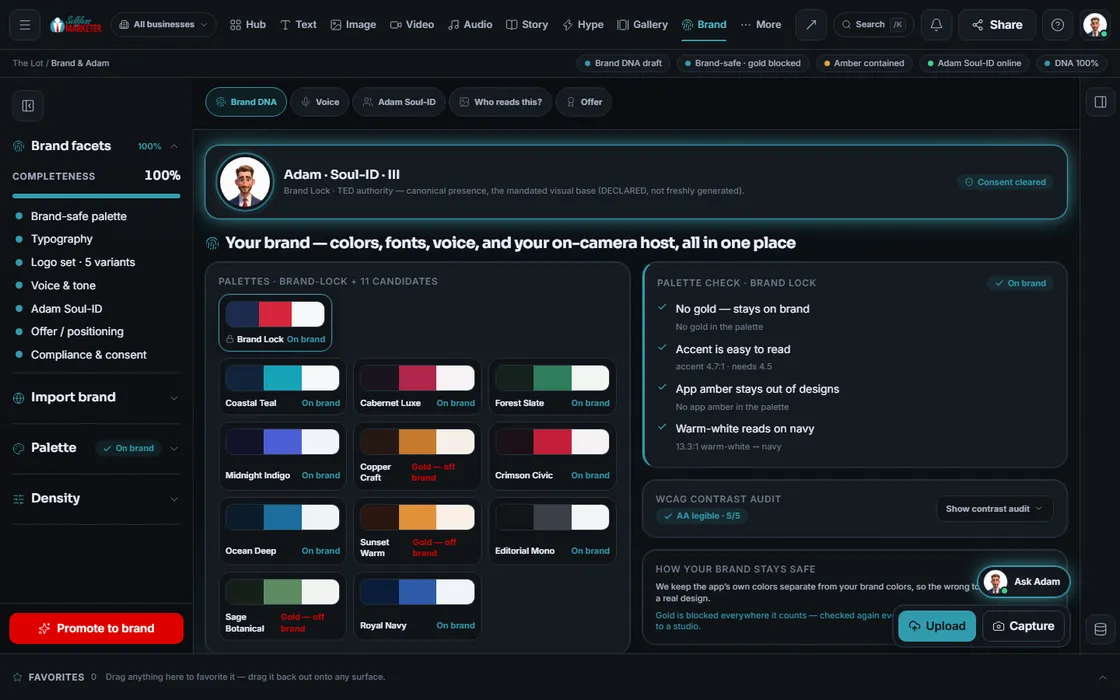 example data
What it is
The brand book the software actually reads
Brand DNA is what the OS reads before making anything: palette, logos, fonts, voice, banned words, core offer and on-camera host. One tap makes it your brand and pushes it to every studio.
Most brands live in an unopened PDF. The blue drifts, writers use words you hate, the flyer's offer doesn't match the site. Here colors are contrast-checked, banned words stripped from drafts, and your offer built into every brief.
For every business that wants to sound like itself everywhere. Your business speaks in YOUR voice, never ours.
Walk it
Set your brand in 6 steps
- 01
Set your colors You
Start with your colors and fonts. Every color is checked for contrast.
 example data
- 02
Set your voice
Set how you sound. Everything is written to match, and your banned words are blocked automatically.
- 03
Meet your host
Pick the on-camera host for your videos, built in Avatar Studio, or none for voice-only and B-roll.
- 04
Lock your offer
Your core offer lives here and goes into every brief, so nothing goes out off-message.
- 05
Make it your brand Approve
One tap makes it your brand and pushes it to every studio.
- 06
See what applies
Open it anytime to see exactly what your studios are using.
Everything included
Everything in Brand DNA
Look
- Brand-locked palette + 11 candidates
- Contrast matrix
- Accent readability check (4.5:1)
- Logo set: 5 variants
- Heading + body fonts
- Taste profile that steers every studio
Voice
- Voice descriptor
- Tone presets: authority, wry, plain-spoken blunt
- 6 tone axes: authority, snark, bluntness, urgency, warmth, premium
- Banned words every draft is told to avoid
- Voice memory every studio reads
Offer and host
- Core offer / positioning
- Built into every brief
- On-camera host with consent status
- Non-removable FTC disclosure for AI presenters
Safety
- Your brand colors kept separate from the app's own colors
- Re-checked on every save and push
- “Who reads this?” view: your brand as a customer sees it
- Every push logged
The rules it follows
- Color: Your accent must be easy to read (4.5:1 contrast). Checked again every time your brand is saved or pushed.
- Logo: The right version for each place, including a horizontal lockup.
- Type: Pre-paired so they look right together.
- Voice: Applied to every piece of writing, automatically.
- Guard words: Every studio is told never to use them.
- Host: Each host carries its consent record. No record, no render.
- Compliance: An AI presenter's #ad disclosure is burned into every export and can't be removed.
Who runs it
YOUR TEAM with the OS, or OUR TEAM for you.
- Approve your colors, voice and offer
- Record consent for any real face or voice
- Press Promote to brand
- Pulls your colors and fonts for review
- Checks contrast and strips banned words
- Pushes your brand into every studio
- Custom logo design
- Builds your Brand DNA on the onboarding call
- Keeps it current as your business changes
Fill in Brand DNA first; everything else gets better. Want help? It's part of the Done-For-You onboarding call.
On the way
Coming soon
These are planned and are not in the software yet. We list them so you know what is next.
Your files help fill in offers, prices and services, for you to approve.
Coming soon: V2See where your brand rules are used in each studio.
Coming soon: V2Keep every fact about your business in one place.
Coming soon: V2Keep going
Related pages
Try the OS
Our free trial is starting soon.
The same tools we use for our done-for-you clients. Our 7-day free trial is starting soon. Until then, book a call and a real person walks you through the OS. $997 a month, first month $497. No contracts.

YOUR TEAM runs it with the OS, or OUR TEAM runs it for you with Done-For-You. Not sure? Which one fits me?