







Social Media
Write once. Show up everywhere.
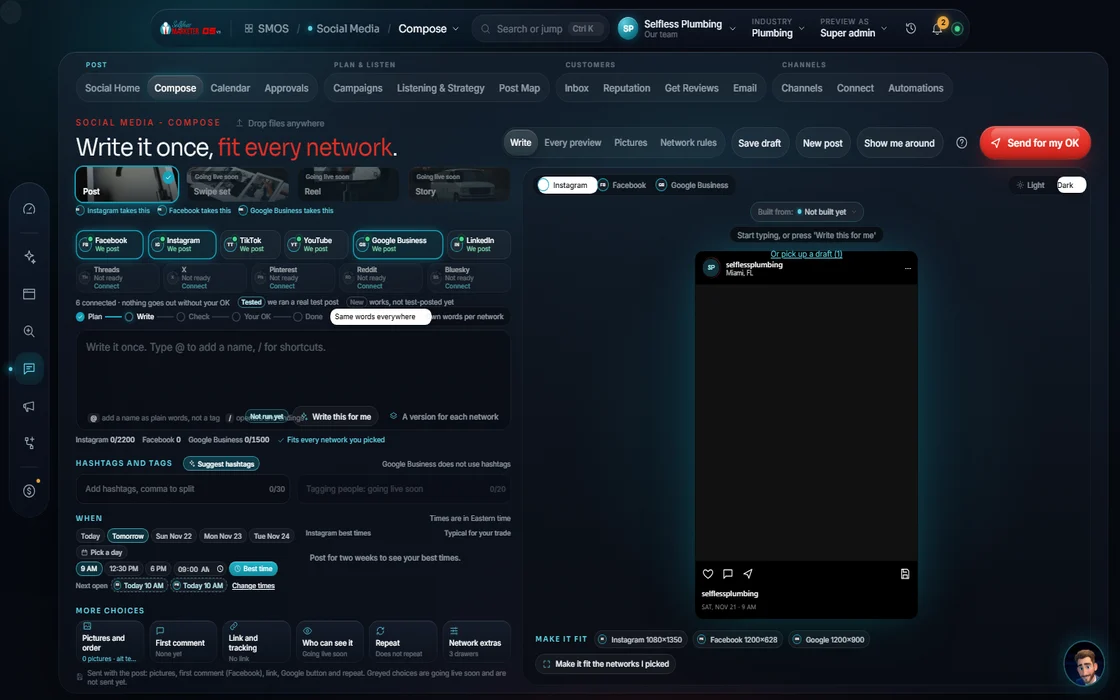
Compose once. Your assistant rewrites per network, waits for your OK, posts at the best time. One inbox catches every reply, review and mention.
 demo business
What it is
Most local businesses aren't posting enough
In our experience, 99 out of 100 local businesses under-post, once or twice a week if that. The feed rewards whoever shows up daily, everywhere buyers scroll.
Done by hand, that's a full-time job. Each network wants its own size, hook and hashtag rule. Replies scatter across apps. Nobody asks for reviews.
The OS fixes it. Write once; your assistant tailors each version onto one calendar and approval queue, and all comments, DMs and reviews return to one inbox. “Everything online is connected, in the era of algorithms”, so posts feed your site and SEO.
For owners who never get to posting, and office managers logging into 6 apps to answer one customer.
 Real
Walk it
Walk the wizard
Social Home asks, “What do you want to do with your public presence?” Six tiles: post, plan, listen, answer, reviews, connect. Below, what needs you today.
- 01
Compose once Your assistant
Your assistant drafts a version per network, how each rewards, with live preview. Best-time snap, collision guard and compliance check run first. It never posts on its own.
example data - 02
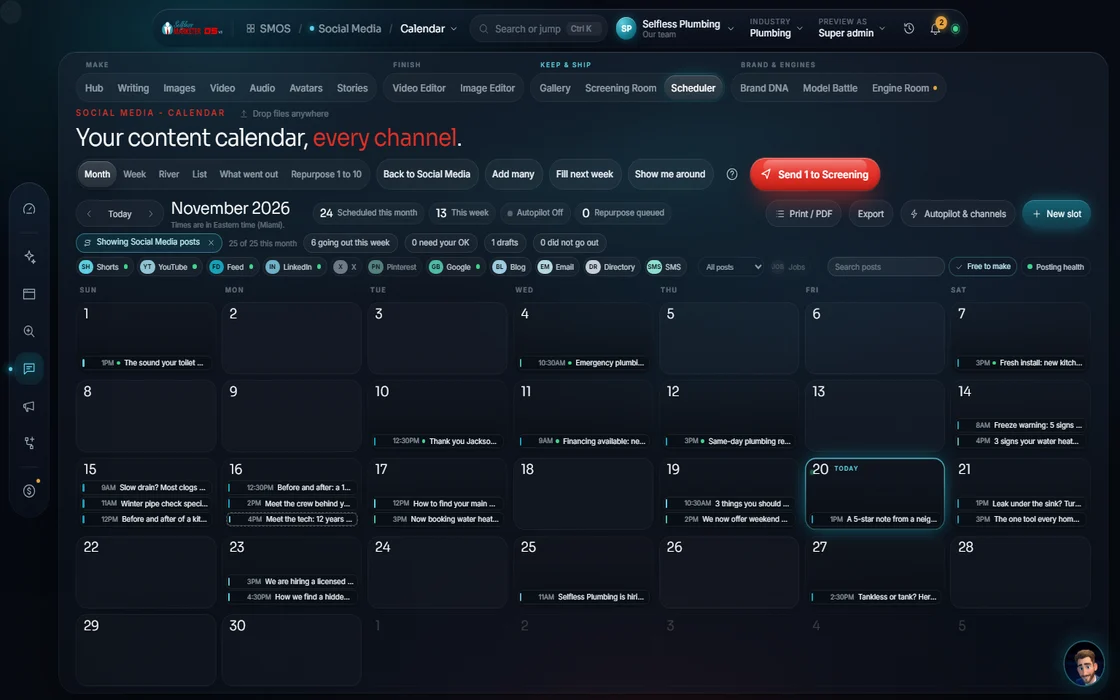
The one calendar
Idea → Draft → Review → Scheduled → Posted, by month, week, list, pipeline or channel. “Fill the gaps” drafts a week. One scheduler, shared with SEO.
 example data
- 03
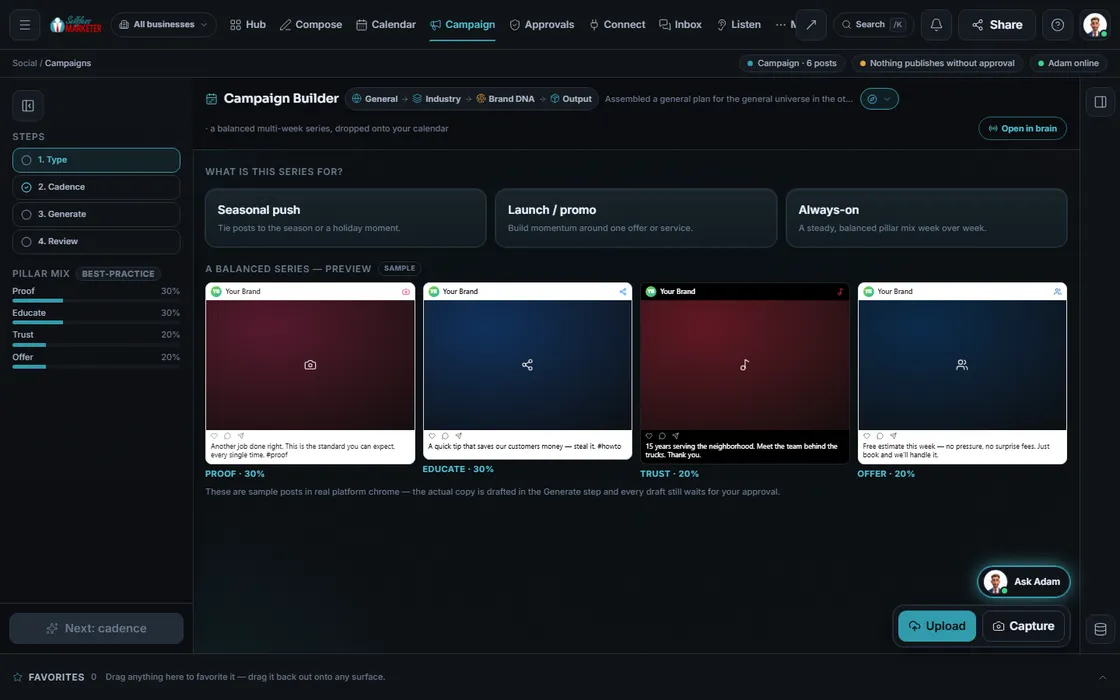
Campaign builder
Seasonal push, launch or steady pillar mix. Set cadence and length; your assistant drafts a balanced multi-week series. Accept or reject each post, and edit any you want changed.
 example data
- 04
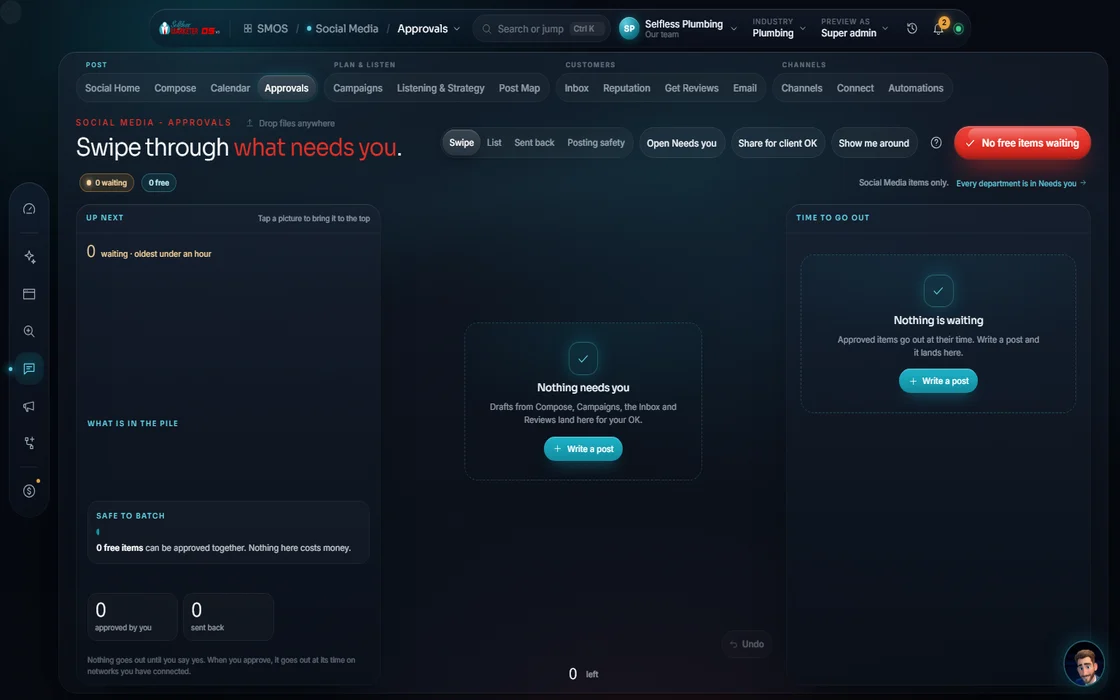
One gate Approve
“Safe to send?” in 7 checks, plus speed and cooling guards.
 example data
- 05
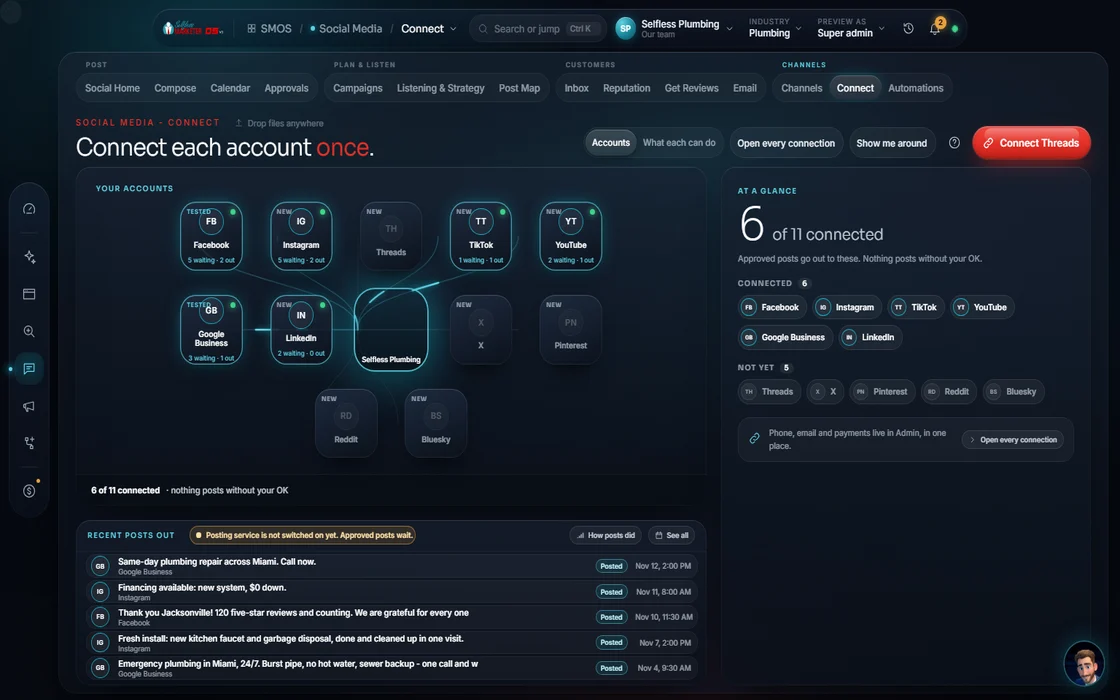
Connect
The channel wall, under your brand.
 example data
- 06
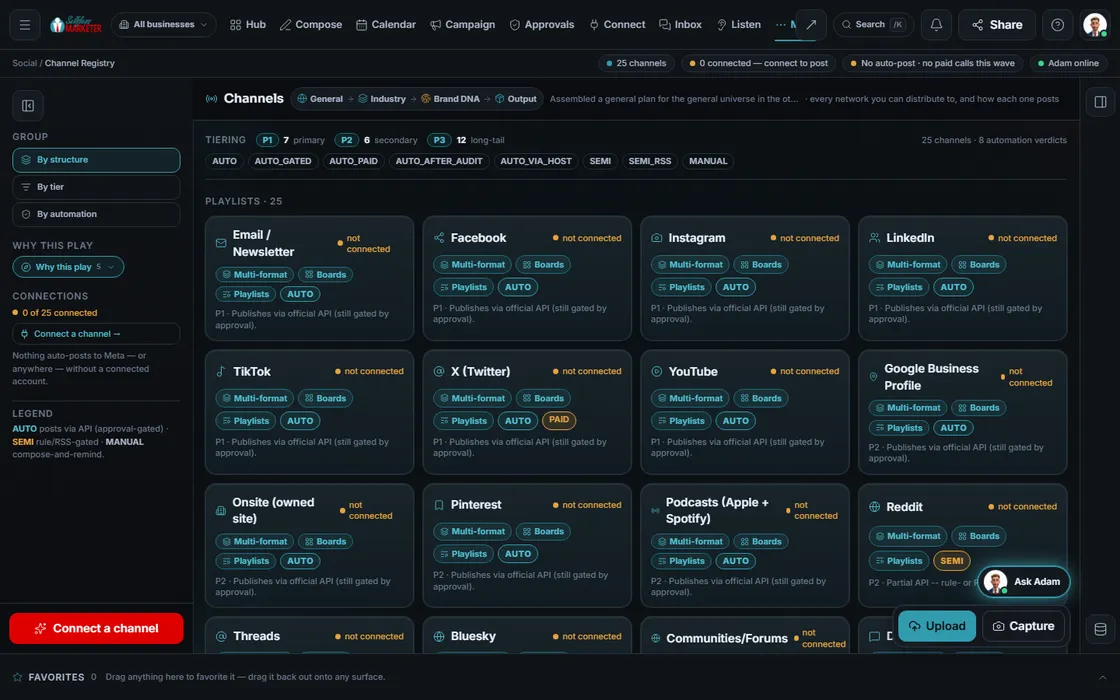
Channels
All channels by structure, tier (P1, P2, P3) and publish mode: auto, semi or manual. Each has a UTM builder (link tracking tags).
 example data
- 07
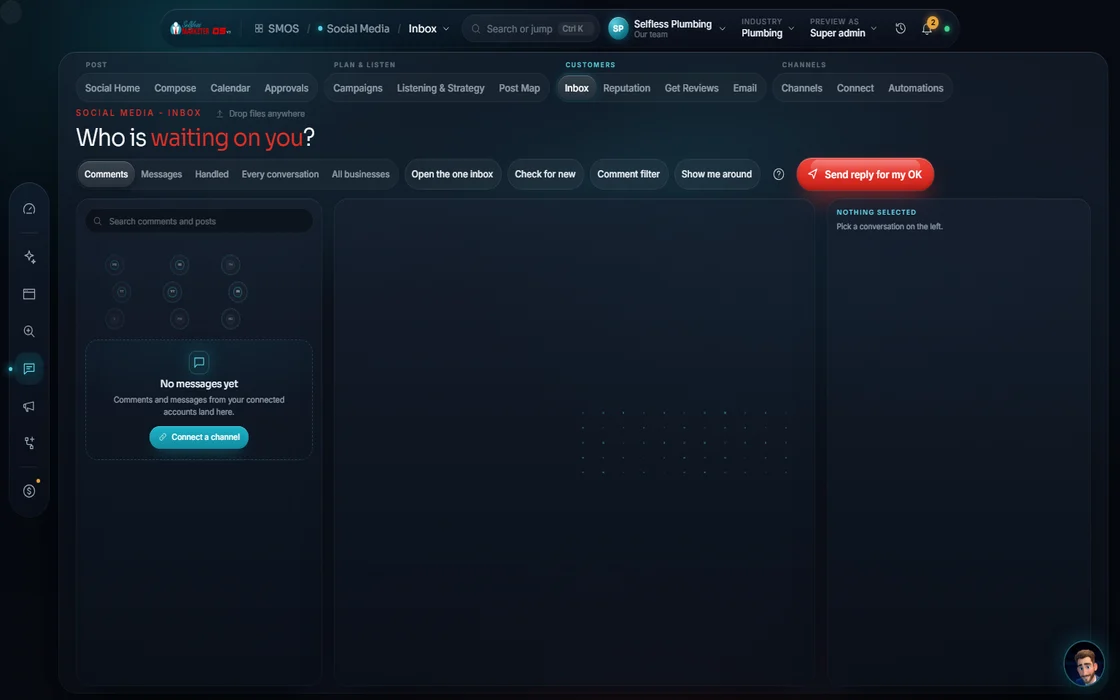
One inbox
DMs and comments from every connected network, threaded, with replies drafted for you to edit. Unhappy DMs go to Reputation; lead DMs go to Campaign.
 example data
- 08
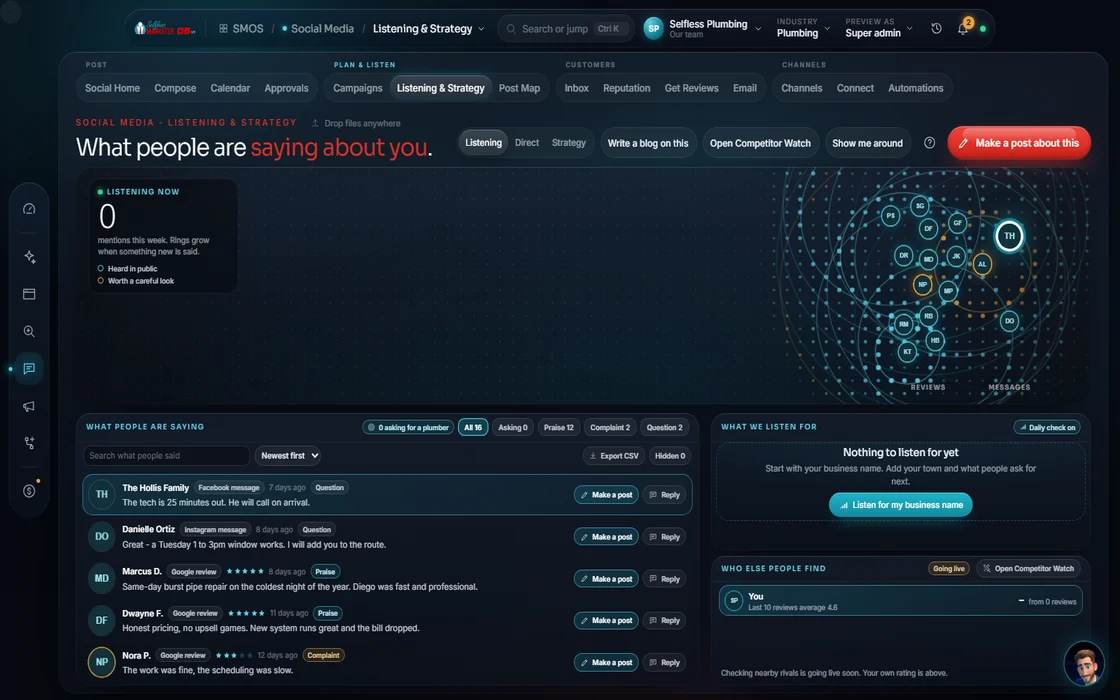
Listen & Strategy
Mentions and sentiment from your reviews and inbox. A content pillar becomes a campaign in one tap.
 example data
- 09
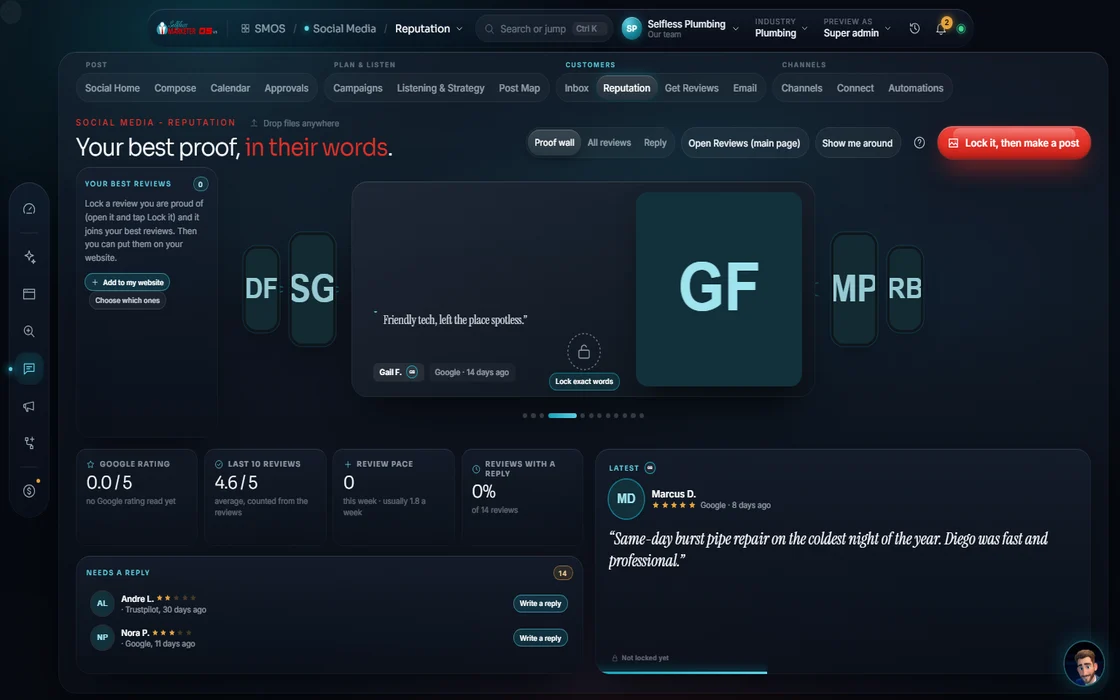
Reputation
Add your reviews and get reply drafts by star level. Google review import is on the way.
 example data
- 10
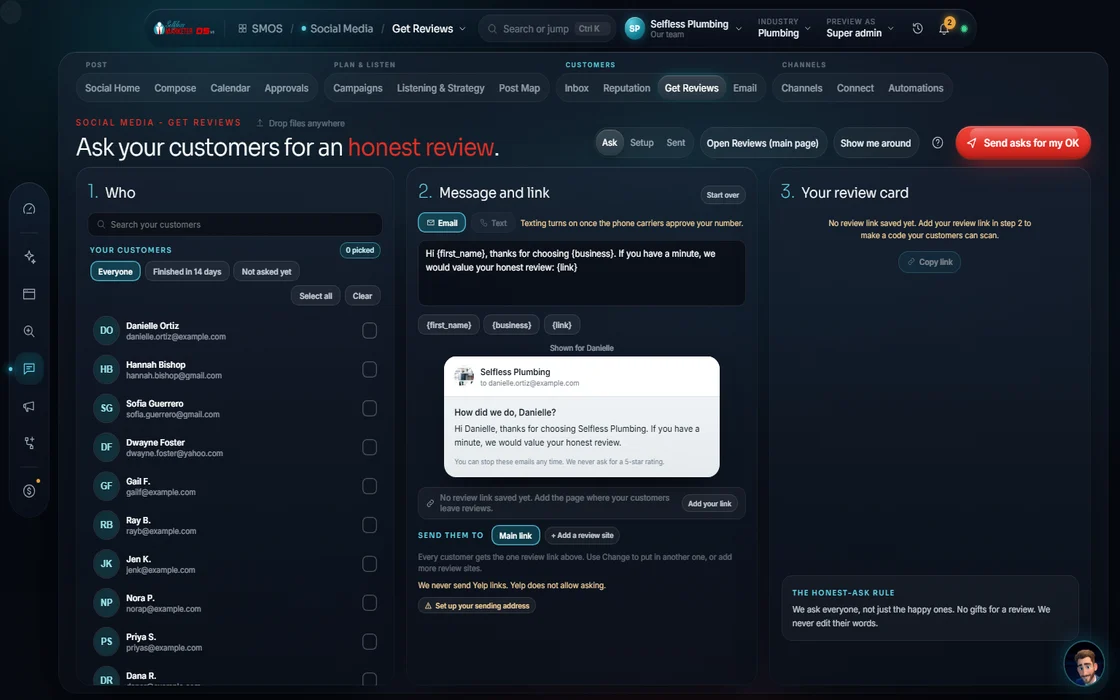
Get more reviews
An 11-step builder: where to ask, when, the text and email, the pace, 30-day spacing and the FTC lock.
 example data
- 11
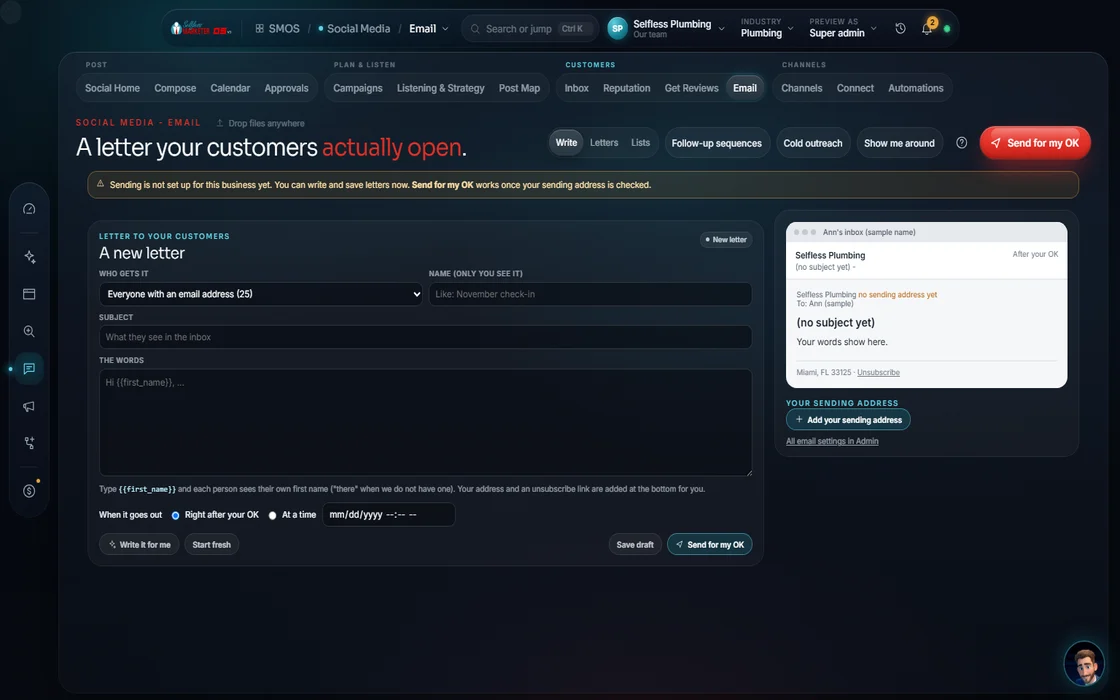
Email & newsletter
Lists, drafts and gated sends: a compliance check, then your approval, then the queue. Never a blast.
 example data
- 12
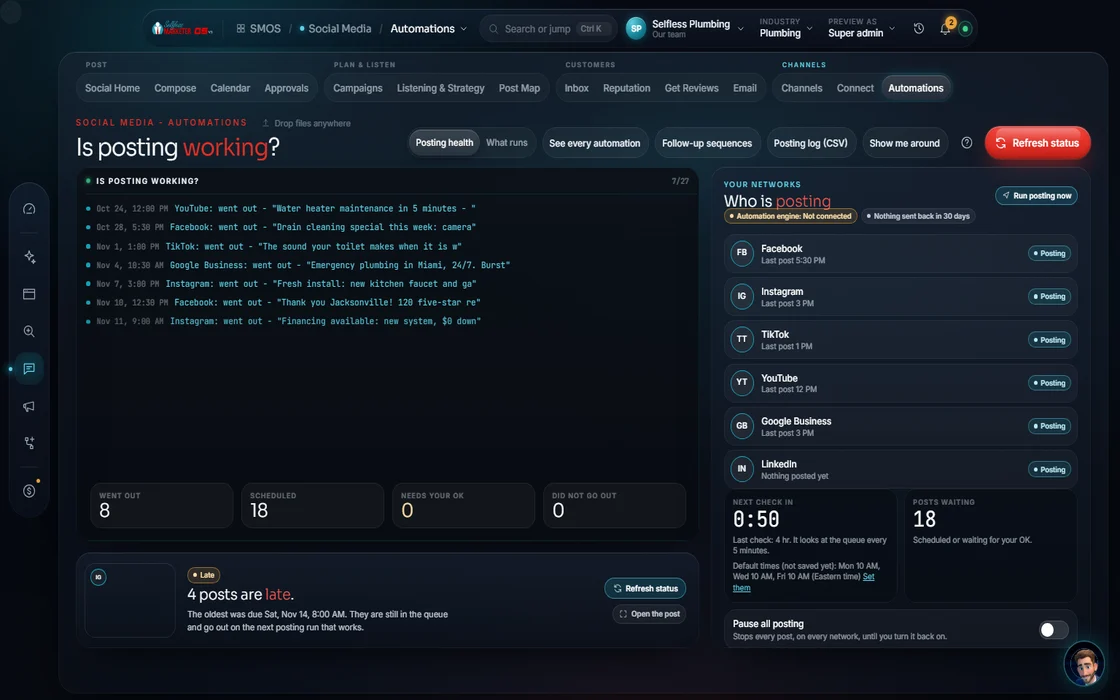
Automations
Form lead → instant text back (once your texting number is approved by the carriers, usually 1-3 weeks; until then you get an alert to call them). Job done → a review ask, the hours you set after the job, for your OK. Missed call → text-back. Every sequence has a STOP.
 example data
Everything included
Everything Social Media includes
Nothing summarized away. Every count here is a Product fact.
The 13 surfaces
- Social Home: 6 intent tiles + what needs you today
- Composer
- Calendar
- Campaign builder
- Approvals
- Connect
- Channels
- Inbox
- Listen & Strategy
- Reputation
- Get More Reviews
- Email & Newsletter
- Automation
Channels and platforms
- Posting structures per channel: playlists, boards, short, video-only, image-only, text-only, multi
- An AUTO / SEMI / MANUAL verdict on every channel
- 178 platforms in the distribution map, in 14 categories, scored for 33 industries
- 8 networks post by API once connected. For the rest, you post by hand from a ready draft.
- Your net: the 7 best-fit platforms for your trade, plus local adds for your city
- The 15-touch buying cycle across 5–7 platforms
Per-platform playbooks (about 10 tactics each)
- Instagram: Reels 9:16, carousels up to 10 frames, a hook in 3 seconds, 3–5 hashtags
- Facebook: lead with the community benefit, ask a question, link in a comment, 1:1 or 4:5 photos
- TikTok: the payoff in the first 1–2 seconds, an on-screen + spoken hook, loop the end
- YouTube: the first 15 seconds restate the title, a custom 1280×720 thumbnail, chapters, Shorts cut from the long video
- LinkedIn: open with a number or a contrarian take, link in the first comment, Tue–Thu in business hours
- X: line one stands alone, link in a reply, reply into relevant accounts
- Pinterest: 2:3 pins, the outcome in the overlay, link to the exact page
- Google Business Profile: the local benefit + a next step, real photos, no hashtags, dated offers
- Reddit: value first, a title that reads like the subreddit, answer the question first
- Threads: a conversational first line, reply chains
- Snapchat: raw, first-person, full-screen 9:16, evening posting
- A 110-tactic checklist that auto-checks what your posts already prove
Calendar & approvals
- 5 views: month, week, list, pipeline, by channel
- States: Idea → Draft → Review → Scheduled → Posted / Failed
- “Fill the gaps” drafts a week
- Best-time windows: measured from your history, or a labeled typical window, never made up
- UTM tags added at schedule time
- 7-check “Safe to send?” before anything goes
- A daily cap and a 30-day spacing guard
- Bulk approve or reject, with reasons (wrong timing, wrong network, factual error)
- A signed client-approval link
Inbox, listening, reputation
- Comments and messages from your connected networks, with drafted replies you copy and send
- AI-suggested and canned replies, sentiment tags, status and assignee
- Mentions and sentiment from your reviews and inbox
- Content pillar target mix and a recommended cadence (labeled a recommendation)
- Rating and pace monitor, an at-risk queue, a Respond studio
- Reply drafts by star level
- Reviews tamper-locked and shown word for word (FTC 16 CFR 255)
- Review schema on your site so search engines read your stars.
Get More Reviews
- Where to ask: text, email or link
- When to ask: a set number of hours after the job
- Text and email templates with merge fields (first name, review link, business name)
- Pace: one ask per customer every 30 days, 50 a day at most
- 30-day spacing per customer
- FTC lock: the same ask for everyone, no rating filter, no incentives, no fake reviews
Email & automations
- Lists, AI drafts and gated sends: CAN-SPAM + consent check → your approval → queue
- Domain warm-up: 100, then 200, then 400
- DKIM and DMARC (email sender checks) required
- Texts: A2P 10DLC + TCPA gated; quiet hours move the slot
- Form or ad lead → CRM → route → a heads-up to your team
- Pick customers → approve the message → review invite
- Missed call → text-back with a booking link → STOP if answered
- New-lead follow-up
- Win-back for contacts quiet for 90 days
- Every sequence has a STOP node
Done by hand on Done-For-You
- Liking and commenting on other people's and businesses' posts in your area
- Influencer shout-outs
The rules it follows
- Optimize: Hook before the fold; the first 125 characters show before “more”; link in a comment on Facebook and LinkedIn; 3–5 hashtags on Instagram, not 30; 0–2 tags on Facebook; captions burned in; a 1280×720 thumbnail on YouTube; no hashtags on Google posts.
- Redistribute: One approved master becomes 10 children in the Dock: reel, carousel, story, quote card, Google post, email, each sized and written for its channel.
- Outbound signals: Done by hand by the Done-For-You team. Not in the software. In the OS on its own it reads “Coming soon.”
- Watch competitors: Competitor Watch: list your rivals and compare them side by side; it saves their pages every day and a scan shows what changed
- SEO tie-in: Every post links to the matching service and city page. Facebook, Yelp and your Google profile count as top-tier citations. Reviews feed your star-rating schema.
- Report: UTM-tagged links on every post, so results show by channel in your report, every number labeled.
The engines behind it
- Claude: Your brand voice; the client-safe writer (owned seat)
- Qwen3 8B: Offline drafts at $0 when the cloud is busy (local, $0)
- Backup writer: Fallback writer when the seat is used up (metered, asks first)
- Telnyx: Text messages, once your number is carrier-approved (A2P 10DLC) (metered, asks first)
- See every engine in this group
Who runs it
YOUR TEAM with the OS, or OUR TEAM for you.
- Approve posts in one pass
- Answer the conversations that need a person
- Publish to Facebook yourself if you prefer: we prep, you post
- Send photos and videos from your jobs
- Drafts every post per network
- Schedules at the best time on one calendar
- Fans one piece into 10
- Drafts replies for you to edit
- Listens, requests reviews and reports
- Daily posts and content, 365 days a year
- Content strategy
- Short and long form videos
- Comment responses and DM management
- Reputation management
- Influencer shout-outs, geotargeting and hashtag research
- Facebook, Instagram, YouTube and more
- Liking and commenting on other people's and businesses' posts in your area, by hand
- A free social audit
Complete platform coverage. 365 days of fresh content. See Social Media Management, done for you.
Liking and commenting on local posts is people work: our Done-For-You team does it by hand, not the software. In the OS alone it reads “Coming soon.” Done-For-You dashboards show the team's weekly work.
In your dashboard
How outbound engagement shows up
Your Selfless Marketer team sets this up for you as part of your Done-For-You. No data yet. First update lands with your weekly report.
Next report: FridayThe team's numbers, in your weekly report, each one labeled "Measured by our team" with the date.
Measured by our team · dated weeklyComing soon. Our team runs this for Done-For-You clients. See what's included
Receipts
Connected work, documented




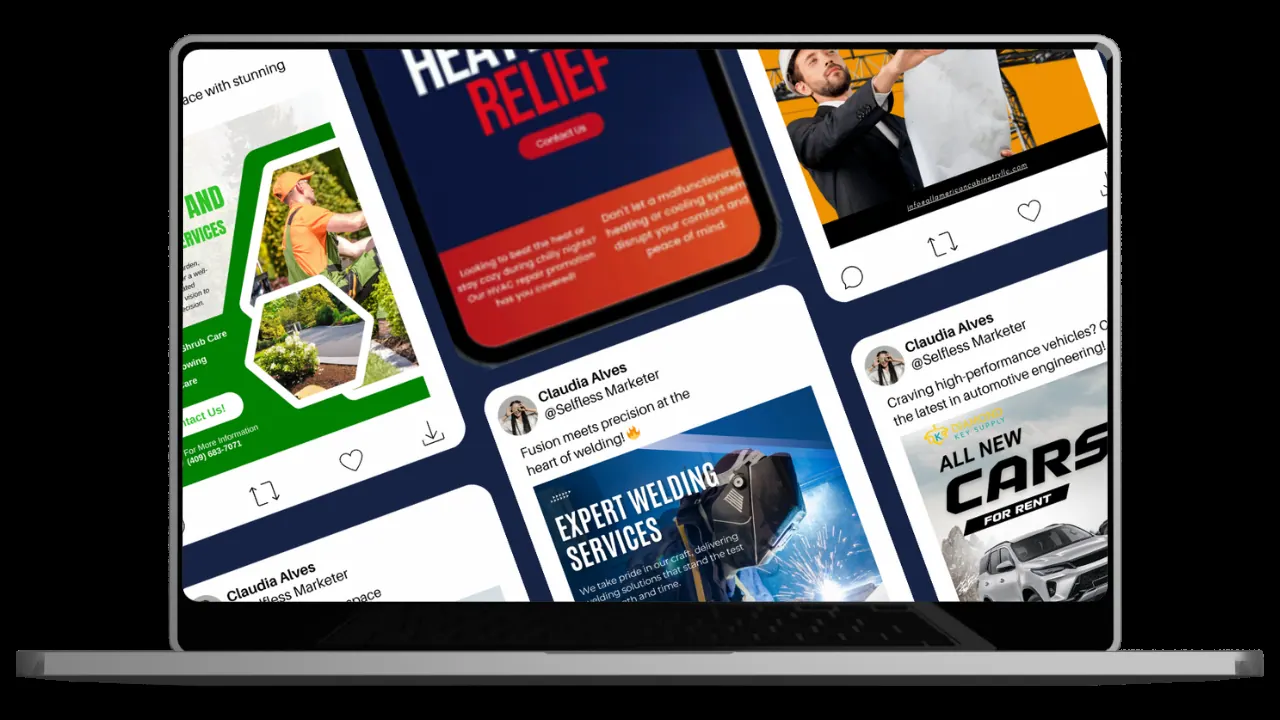
Real client work Graphics made by our team.
Past client results, documented from each client's analytics and ad accounts. Results vary.
Built: Composer, calendar, campaigns, approvals, connect, channels, inbox, listening, reputation, review builder, email, automations. Auto-publish runs only to connected networks; many are compose-and-remind. Texts and emails go live once your number is carrier-approved and sending domain set up. The job-complete review trigger isn't wired yet. Facebook reviews can't be pulled (Meta retired that door).
On the way
Coming soon
These are planned and are not in the software yet. We list them so you know what is next.
See where your posts reach on a live globe.
Coming soon: V3Go deeper
Every Social Media page
Each surface has its own page and walk-through.
ComposerWrite once; every network gets its own versionCalendarOne calendar, shared with SEOCampaign BuilderA balanced multi-week series in one goApprovalsThe one gate: 7 checks before anything postsConnectThe channel wall and the honest verdictsChannelsAll channels and their rulesInboxEvery DM and comment, one placeListen & StrategyWhat people say, measuredReputationEvery review, word for wordGet More ReviewsThe 11-step review builderEmail & NewsletterGated sends, never a blastAutomationFollow-up flows with a STOP on every oneQuestions owners ask about social media
Do you post to Facebook automatically?
No. For Facebook, we prep and you publish; we never auto-post to Meta. On Done-For-You, our team handles it.
How often will it post?
As often as each platform rewards, ramped slowly so it never reads as spam. Most local businesses post once or twice a week (our experience); write once, post to every network you connect makes daily realistic.
Will the posts sound like a robot?
Written in your voice from your Brand DNA, every claim tied to a real fact, and you approve each one.
Does the OS like and comment on other businesses' posts?
No. That's people work, done by hand by our Done-For-You team. In the OS alone it reads “Coming soon.”
Can I see my Facebook reviews here?
No. Meta retired the door that let software pull Page reviews, and we say so. Google, Yelp, BBB and Trustpilot reviews land word for word.
Which platforms will I be on?
Your net: the 7 best-fit platforms for your trade, from a map of 178, plus local city adds. See all 178 platforms.
Keep going
Related pages
Try the OS
Our free trial is starting soon.
The same tools we use for our done-for-you clients. Our 7-day free trial is starting soon. Until then, book a call and a real person walks you through the OS. $997 a month, first month $497. No contracts.

YOUR TEAM runs it with the OS, or OUR TEAM runs it for you with Done-For-You. Not sure? Which one fits me?