







Social Media · Composer
Write it once. Every network gets its own version.
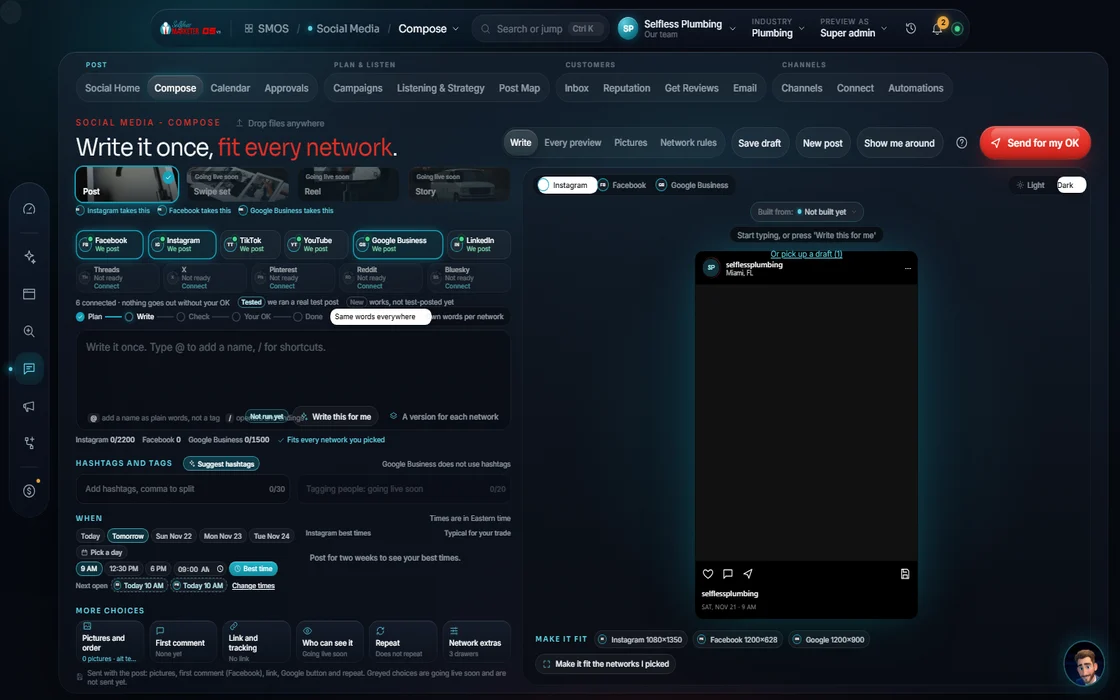
Tell your assistant what to say. The Composer drafts it in your voice, rewrites it for what each network rewards, shows a live preview, then sends it to Approvals. It never posts on its own.
 demo business
What it is
1 caption pasted everywhere reads wrong everywhere
Most owners paste 1 caption on every network. Each network rewards something different.
The Composer fixes it: give it a short brief and pick your networks. Your assistant drafts from your Brand DNA: your offer, your words, the words you never use. Then it writes 1 caption per network, each shown in that network's real look.
Every post in the Social Media department starts here. It drafts and queues; publishing happens only at Approvals, after you say yes.
Watch it work
From a 1-line brief to a queued draft
7 short steps. Press “Do it for me” anytime and your assistant fills in the rest for you to check.
- 01
Type a brief You
1 sentence is enough: “Before and after on today's water heater job.” Pick networks from the channel list; each shows what it can carry.
- 02
Draft with your assistant Your assistant
Your assistant writes the first version from your Brand DNA on the free-first writing engines. Or type your own.
- 03
Rewrite per network Your assistant
1 caption per network for you to edit; your edits stay with the post.
- 04
Check the live previews
See it as it will look on Instagram, Facebook, TikTok, X and LinkedIn.
- 05
Attach your photos and video
Media comes from the Content studios by reference, never as a loose copy, so the file you approved is the file that posts.
- 06
Snap to the best time
The time field reads your best time to post. A collision guard keeps 2 posts from landing on top of each other.
- 07
Preflight and send Approve
A compliance check runs, then the drafts go to Approvals. Nothing publishes from the Composer.
Everything included
What the Composer includes
Drafting
- Draft with your assistant from your Brand DNA
- Your own copy, any time
- 1 caption per network
- Accept, edit or reject teaches your Brand DNA
- A sample post until you type, never a fake live post
Fit
- Live previews: Instagram, Facebook, TikTok, X, LinkedIn
- Format checks per channel
- Posting structures from the 25-channel registry
- 10 per-platform playbooks, about 10 tactics each
- The 110-tactic checklist that ticks off what your posts already prove
- Uncroppable networks skipped, never force-cropped
Timing
- Best-time snap
- A calendar slot for each draft
- Collision guard
Hand-offs
- Media from the Content studios, by reference
- Grow a post into a Campaign series
- Every draft goes to Approvals
- A UTM tag on every link
The rules it follows
- Optimize: Instagram: hook in 3 seconds, 3-5 hashtags, link in bio or first comment. Facebook: community benefit first, 0-2 tags, outbound link in a comment. LinkedIn: a number up front, 3 hashtags. X: line 1 stands alone.
- Fit the format: Checks size live: Reel 9:16, carousel up to 10 frames (frame 1 is the promise, the last is the call to action), feed 4:5, pin 2:3. A network that can't take the crop is skipped, never force-cropped.
- Hook: The first 125 characters show before “more”, so the hook goes there. Captions are burned into video for people watching on mute.
- Schedule: Snaps to your best time: teal when measured from your own posting history, amber for a typical window, never a made-up time.
- Check: A compliance preflight runs first. A failed check blocks the draft and names the rule it broke.
- SEO tie-in: Links point to the matching service and city page on your site, so each post feeds your search rankings.
- Publish: Never from here. Drafts drain to Approvals.
The engines behind it
- Claude: Writing in your voice, per network (owned seat)
- Backup writer: Backup writer when the first is busy (metered, asks first)
- Qwen3 8B: Fast first drafts (free engine, $0)
- See every engine in this group
Who runs it
YOUR TEAM with the OS, or OUR TEAM for you.
- Type the brief, or just press “Draft a post for me”
- Change any caption you want
- Publish the prepped Facebook and Instagram posts
- Drafts every version in your voice
- Checks formats and finds the time
- Runs the preflight and queues it for your OK
- Writes daily posts for Done-For-You clients
- Adds geotargeting and hashtag research
- Publishes the prepped Meta posts for you, if you want
The Composer never posts. Live posting runs only to networks you've connected; the rest are compose-and-remind. For Facebook and Instagram, we prep and you publish; we never auto-post to Meta. With Done-For-You, our team writes and preps your daily posts.
On the way
Coming soon
These are planned and are not in the software yet. We list them so you know what is next.
Turn one long video into short posts.
Coming soon: V2Ready-made choices for post types and styles.
Coming soon: V2See your post in a frame shaped like each network.
Coming soon: V2Get several picture choices for a post. Cost is shown first.
Coming soon: V2Keep going
Related pages
Try the OS
Our free trial is starting soon.
The same tools we use for our done-for-you clients. Our 7-day free trial is starting soon. Until then, book a call and a real person walks you through the OS. $997 a month, first month $497. No contracts.

YOUR TEAM runs it with the OS, or OUR TEAM runs it for you with Done-For-You. Not sure? Which one fits me?