







Social Media · Channels
Every channel, 1 place. And the truth about how each one posts.
The Channels registry lists all 25 distribution channels: what each carries, size limits, priority, and whether it posts automatically, partly, or by hand with a reminder.
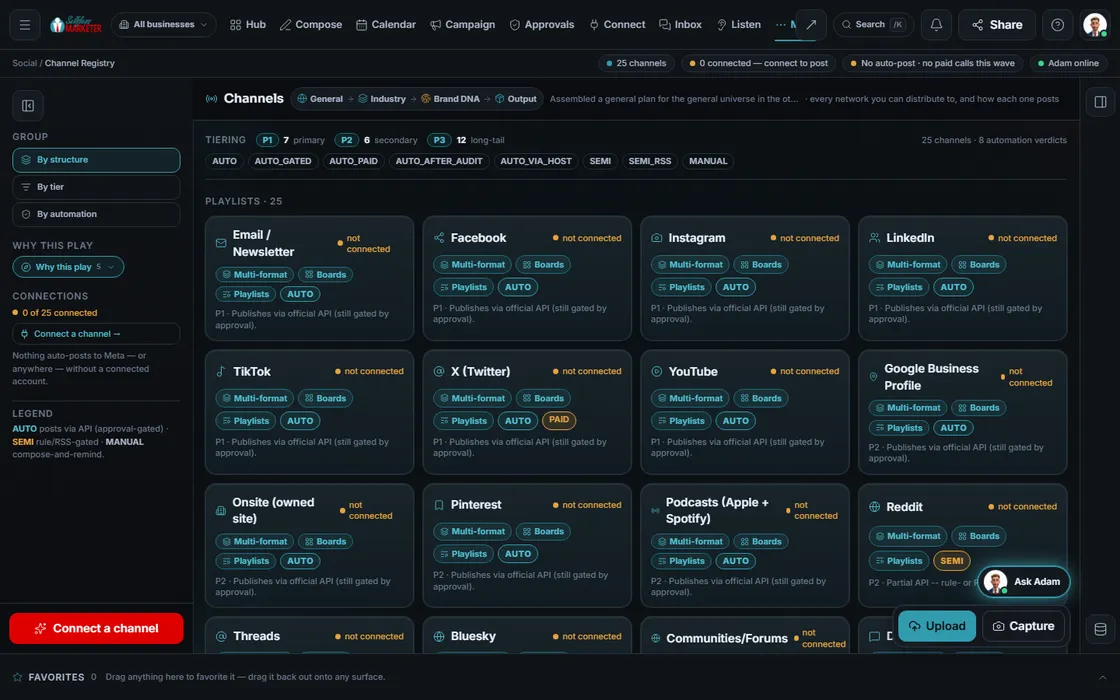 example data
What it is
Not every channel posts the same way
Some networks let software post for you. Some only partly. Some have no posting door. Most tools hide that and leave you guessing why a post never went out. We show it.
Each channel carries an honest verdict. Auto: publishes through the official door, still only after you approve. Semi: partly, through a rule or feed. Manual: no posting door, so compose-and-remind, never a fake “posted”.
Behind the channel wall is a bigger map: 178 platforms scored for 33 industries. 31 can be published to directly, 9 through a partner, 4 are read-only, 84 claim-and-maintain, 27 paid-lead-only and 23 earned or offline. Your industry net picks the ones that matter for your trade.
Watch it work
Find the right channel in 4 steps
- 01
Group the list You
By structure (playlists, boards, short-form, video-only, image-only, text-only, multi-format), by tier, or by how it posts.
- 02
Open a channel
See its formats, its size limits, its rules and a sample post in that channel's real look.
- 03
Read the flags
Paid means posting costs money, so it asks first. Gated means the network needs partner approval before posting.
- 04
Send it or link it Your assistant
Send the channel to the Composer or a Campaign with its formats attached. Build a UTM link so its visits get counted.
Everything included
What Channels includes
Structures
- Playlists
- Boards
- Short-form
- Video-only
- Image-only
- Text-only
- Multi-format
Verdicts and tiers
- Auto: official door, still approval-gated
- Semi: rule or feed based
- Manual: compose-and-remind
- P1 primary, P2 secondary, P3 long-tail
- Paid and gated flags
Per channel
- Formats and size limits
- Posting rules
- Sample post in real chrome
- Top tactic for the channel
- Media types: text, video, image, audio
The map behind it
- 178 platforms in 14 categories
- Fit scored for 33 industries
- UTM builder
- Send to Composer or Campaign
The rules it follows
- Structures: Lists each channel's posting structures, so the Composer only offers what that channel can carry.
- Format limits: A format ladder per channel governs what fits. Content that doesn't fit is reshaped or skipped.
- Cost: Paid channels are flagged. Nothing spends until you approve it.
- Hand off: Sends a channel to the Composer or a Campaign by reference, never a copy.
Who runs it
YOUR TEAM with the OS, or OUR TEAM for you.
- Look up what a channel can do
- Choose which channels you want in your plan
- Post the manual ones when reminded
- Keeps the specs and limits for all 25
- Shapes every draft to fit
- Flags paid and gated channels
- Picks your channels from your industry and city net
- Runs the manual and hand-posted channels
- Adds platforms as your plan grows
Live auto-posting runs only to connected channels, only after approval. Many channels are compose-and-remind. Facebook and Instagram are prepped for you to publish. With Done-For-You, our team runs every channel in your net.
On the way
Coming soon
These are planned and are not in the software yet. We list them so you know what is next.
One simple page with all your links.
Coming soon: V2See which places fit your trade and area, and how each one works.
Coming soon: V2Find the few places that reach most of your buyers.
Coming soon: V3Keep going
Related pages
Try the OS
Our free trial is starting soon.
The same tools we use for our done-for-you clients. Our 7-day free trial is starting soon. Until then, book a call and a real person walks you through the OS. $997 a month, first month $497. No contracts.

YOUR TEAM runs it with the OS, or OUR TEAM runs it for you with Done-For-You. Not sure? Which one fits me?