







Social Media · Calendar
1 calendar. Every post, every channel, every state.
See everything going out by month, week, list, pipeline or channel. Draft your week on the Social calendar and approve it. Nothing posts on its own.
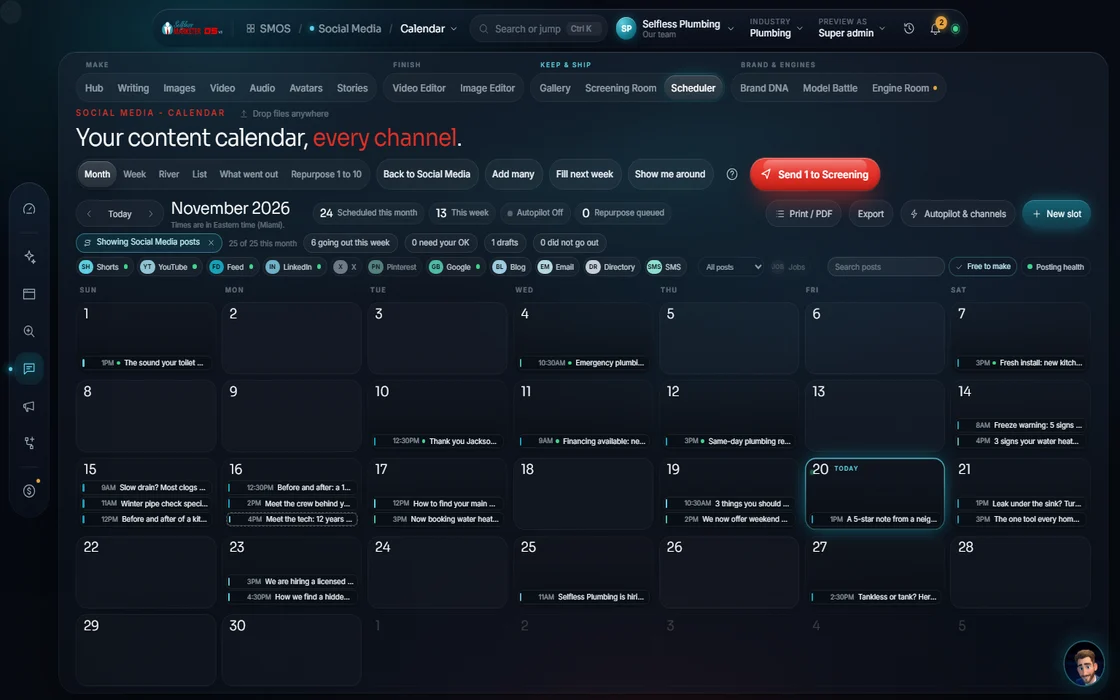 demo business
What it is
Most local businesses aren't posting enough
In our experience, 99 out of 100 local businesses don't post enough, once or twice a week if that. Nobody has time to plan it. So the page goes quiet, and the business looks closed.
The Calendar is the plan. Posts from the Composer, series from the Campaign Builder and SEO posts all land on 1 board: what's going out, what's waiting on you, what failed. Empty days show empty, so you see the gaps.
It's the only scheduler in the OS. The SEO & AI Search calendar mirrors it, so a Google post and an Instagram reel never fight for a slot.
 Real
Watch it work
How a week fills up
6 steps from an empty month to a full, approved week.
- 01
Pick a view You
Month, week, list, pipeline, or by channel.
- 02
Press Fill the gaps Your assistant
Your assistant drafts a week from your content pillars. Every one arrives as a draft, not a post.
- 03
Click a day to write
Any empty slot opens the Composer with that date and time already set.
- 04
Read the best-time colors
Teal is measured from your own posting history. Amber is a typical window. Muted means not set. Never a made-up time.
- 05
Move, approve or open Approve
Drag a post to reschedule. Approve it to queue it. Open it to edit in the Composer.
- 06
Watch the states change
Draft, Scheduled, Posted or Failed. A failed post says so; it's never shown as posted.
Everything included
What the Calendar includes
Views
- Month
- Week
- List
- Pipeline
- By channel
- Bloom: brand to networks to posts
Planning
- Click a day to compose
- Drag to reschedule
- Repeat a post on a schedule
- Long-form cut into short-form moments
Timing
- Best-time windows, color-coded by how we know them
- Collision guard
- A link tagger in Channels
Honesty
- States: Idea, Draft, Review, Scheduled, Posted, Failed
- Failed means failed, never a fake “posted”
- Manual channels marked compose-and-remind
- Mirrored to the SEO calendar, never a second scheduler
The rules it follows
- Plan: 1 shared board for every channel, in 5 views. Reschedules and approvals write back, so what you see survives a refresh.
- Fill: Fill the gaps drafts an empty day from your pillar mix. A sparse calendar stays honestly sparse, never padded with fakes.
- Cadence: Ramps posting up slowly, toward the most each network rewards before it reads as spam.
- Time it: Best-time windows measured from your own history where we have it; labeled typical windows where we don't.
- Approve: Approving queues a post. The scheduler then publishes it or marks it failed. Nothing posts without your OK.
Who runs it
YOUR TEAM with the OS, or OUR TEAM for you.
- Look at the week and approve it
- Post the compose-and-remind items when reminded
- Move anything you want moved
- Drafts the empty days from your pillars
- Finds your best times
- Publishes approved posts to connected channels
- Plans and fills 365 days of fresh content for Done-For-You clients
- Ramps your cadence up slowly, platform by platform
- Handles the hand-posted channels
Nothing posts until a channel is connected and you approve. Facebook and Instagram are prepped for you to publish; we never auto-post to Meta. With Done-For-You, our team fills this calendar daily.
On the way
Coming soon
These are planned and are not in the software yet. We list them so you know what is next.
A best posting time learned from your own results.
Coming soon: V2Add posts to set time slots; repeats still need your OK.
Coming soon: V2Drag posts and watch them settle into place.
Coming soon: V2Keep going
Related pages
Try the OS
Our free trial is starting soon.
The same tools we use for our done-for-you clients. Our 7-day free trial is starting soon. Until then, book a call and a real person walks you through the OS. $997 a month, first month $497. No contracts.

YOUR TEAM runs it with the OS, or OUR TEAM runs it for you with Done-For-You. Not sure? Which one fits me?