







SEO & AI Search · Calendar
Every SEO piece, on 1 plan. Shared with Social, never a 2nd scheduler.
See every Google post, article, press release and email by month, week, list, board or lane. Each shows how it goes out. Nothing publishes without your OK.
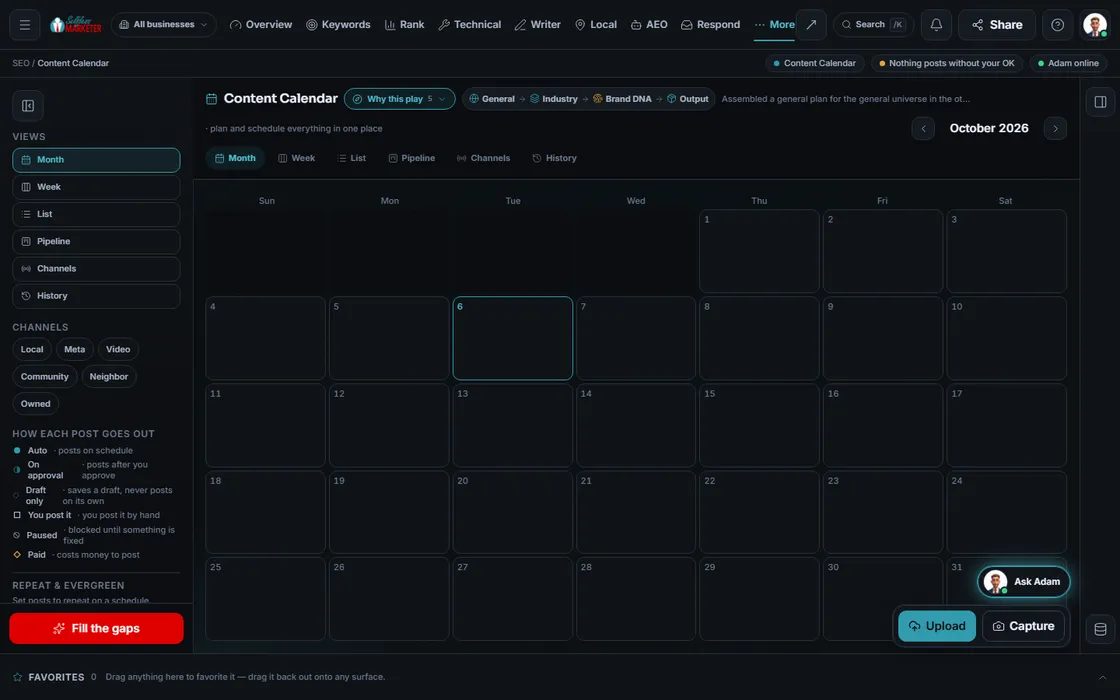 example data
What it is
SEO is a schedule, not a one-time job
Campaigns end; SEO doesn't. A city page this month, weekly Google posts, an article before busy season, a release when there's news. Miss the timing and the season passes.
The SEO Calendar lays out every SEO piece, mirroring the Social calendar: SEO owns these views; Social posts. No slot conflicts, nothing scheduled twice.
Each channel has its rules: some post on schedule once connected, some wait for approval, some you post by hand. Each piece shows which.
Watch it work
From an empty month to a full plan
6 steps. Every piece moves Idea → Brief → Draft → Review → Scheduled → Published.
- 01
Pick a view You
Month, week, list, board or lane. Same plan, 5 ways to look at it.
- 02
Press Fill the gaps Your assistant
New here? Your assistant drafts a full week. Each piece arrives as a draft, never a post.
- 03
Check the season
Seasonal lead-time warnings tell you when to start a push, early enough for it to matter.
- 04
Tune any piece
Open it to set its time (now, best time, 2nd-best, queue or recurring), channel and go-live rule.
- 05
Fix what's blocked
A blocked piece says why, like a channel needing reconnection. You're warned well before a connection lapses.
- 06
Approve Approve
Approving queues the piece for its channel. Nothing publishes on its own.
Everything included
What the SEO Calendar includes
Views
- Month
- Week
- List
- Lane (by channel)
- Board
Stages
- Idea
- Brief
- Draft
- Review
- Scheduled
- Published
Timing
- Now
- Best time
- Add to queue
- Recurring
- Seasonal lead-time warnings
- Seasonal push plan
- Reconnect warnings
Rules
- Posts on schedule
- On approval
- You post it
- Blocked until fixed
- Email sender checks
- Quiet-hours move
- Canonical tag on Medium / Substack
- AI-citation chance (modeled)
The rules it follows
- Quiet hours: A piece set inside quiet hours is moved to an allowed slot, not just flagged.
- Metered channels: Posting costs money, so a budget check runs and it asks first.
- Guards: Some channels carry a value guard, a link-ratio guard or a no-asking check, and stay manual.
Who runs it
YOUR TEAM with the OS, or OUR TEAM for you.
- Approve each piece, or approve the safe ones in a batch
- Post the manual ones: Google Q&A, Facebook (we prep, you publish)
- Tell us about busy seasons and news
- Fills the gaps with drafts
- Applies each channel's rules and limits
- Warns before a season or a reconnect
- On Done-For-You, fills and runs the calendar for you
- Plans seasonal pushes ahead of time
- Shows every piece in your dashboard as it goes out
Nothing publishes on its own. Unconnected channels show "Not connected"; auto-posting goes live per account once connected. Facebook: we prep, you publish. On Done-For-You, our team keeps it full.
Keep going
Related pages
Try the OS
Our free trial is starting soon.
The same tools we use for our done-for-you clients. Our 7-day free trial is starting soon. Until then, book a call and a real person walks you through the OS. $997 a month, first month $497. No contracts.

YOUR TEAM runs it with the OS, or OUR TEAM runs it for you with Done-For-You. Not sure? Which one fits me?