







Social Media · Approvals
The 1 gate. Approve is the only thing that publishes.
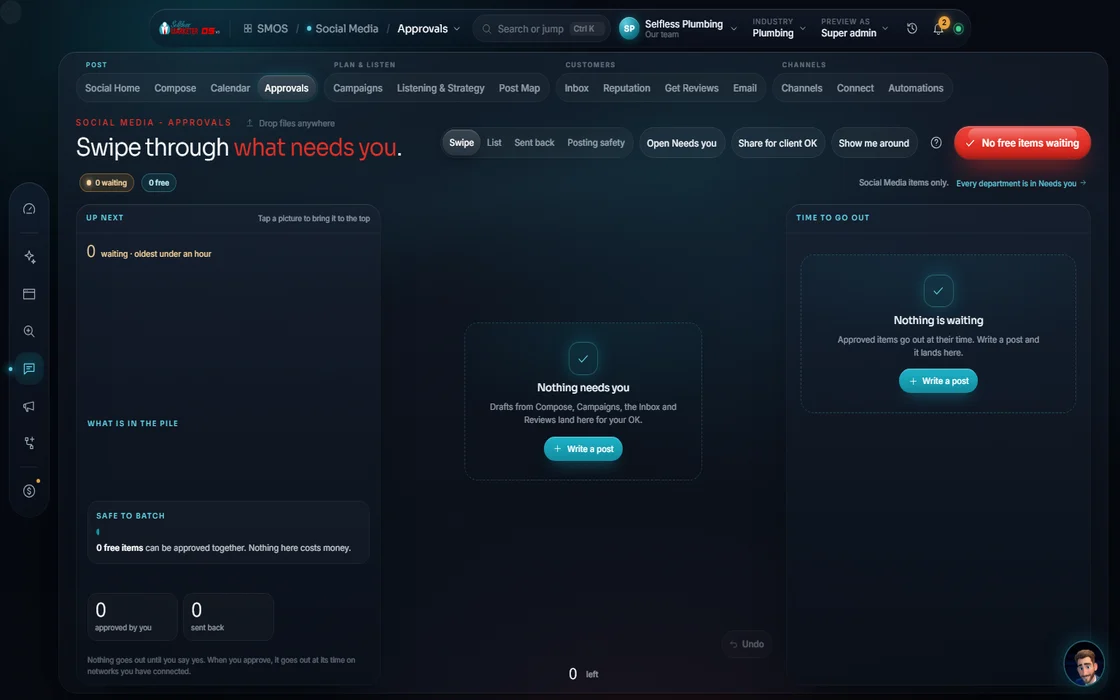
Every draft from every social screen lands here: posts, campaign series, inbox replies and review responses. You approve, hold or reject. Nothing goes out any other way.
 demo business
What it is
You stay in charge of everything with your name on it
Software that posts on its own is how a business ends up with the wrong price, city or tone in public. We built the opposite: every draft waits for a person.
Approvals is that waiting room. Drafts arrive from the Composer, Calendar, Campaign Builder, Inbox and Reputation. Each first runs a 7-check “Safe to send?” test. A blocked draft can't be approved until fixed.
Approved posts go to your calendar.
Watch it work
Clear the queue in 5 moves
- 01
See what is waiting
Filter by all, draft, queued, posted or failed. The most urgent sits at the top.
- 02
Open a draft You
The Review tab shows the post in its real platform look and how it will publish. The Data tab shows where each fact came from.
- 03
Run “Safe to send?”
7 checks run on the draft. A BLOCK disables Approve and names the rule. Velocity and cooling guards stop over-posting.
- 04
Approve, hold or reject Approve
Approve in bulk or 1 by 1. Reject with a reason (wrong timing, wrong network, factual error) and a note, and the next draft learns.
- 05
Share or send on
Send a signed approval link to a partner. Turn an approved post into a Campaign series, or repeat it on the Calendar.
Everything included
What Approvals includes
The gate
- Every social post waits for your OK
- 7-check “Safe to send?” preflight
- Hard block on a compliance fail
- Velocity guard
- Cooling guard
Deciding
- Approve, hold or reject
- Bulk approve and bulk reject
- Reasons: wrong timing, wrong network, factual error
- Free-text notes
- Honest bulk tally
Reviewing
- Real platform preview
- Publish mode shown per post
- Data tab: where every fact came from
- Filters: all, draft, queued, posted, failed
After
- Post by hand from a ready draft on unconnected channels
- Send to Campaign
- Send to Calendar to repeat
- Reviews kept word for word in replies
The rules it follows
- Pace: Velocity and cooling guards stop too many posts too fast, and the same thing re-posted too soon.
- Decide: Approve is the only publish trigger. Approve queues the post; connected networks publish it.
- Learn: Reject captures a reason code and free text. The reason is saved with the post.
- Report: A publish error marks the post failed. It is never shown as posted.
Who runs it
YOUR TEAM with the OS, or OUR TEAM for you.
- Approve, hold or reject
- Give a reason when you reject
- Or set a rule that lets our team approve for you
- Runs the 7 checks on every draft
- Paces posting with the velocity and cooling guards
- Publishes approved posts to connected networks
- Fills the queue for Done-For-You clients
- Fixes anything you send back, with your reason in hand
- Approves on your behalf only where you set that rule
Approving publishes only to networks you've connected. Anything else stays queued, never faked as posted. Facebook and Instagram posts are prepped for you to publish. With Done-For-You, our team prepares everything here.
On the way
Coming soon
These are planned and are not in the software yet. We list them so you know what is next.
Draw right on a post preview and leave notes.
Coming soon: V2Keep going
Related pages
Try the OS
Our free trial is starting soon.
The same tools we use for our done-for-you clients. Our 7-day free trial is starting soon. Until then, book a call and a real person walks you through the OS. $997 a month, first month $497. No contracts.

YOUR TEAM runs it with the OS, or OUR TEAM runs it for you with Done-For-You. Not sure? Which one fits me?