







Social Media · Email & Newsletter
Your newsletter lane. Checked first, approved by you, never a blast.
Sending isn't connected yet: build lists and drafts today; sends switch on once your email service is connected. Build lists, draft with your assistant, queue a send. Each send is compliance-checked, then waits for your approval. Your domain is set up and warmed first.
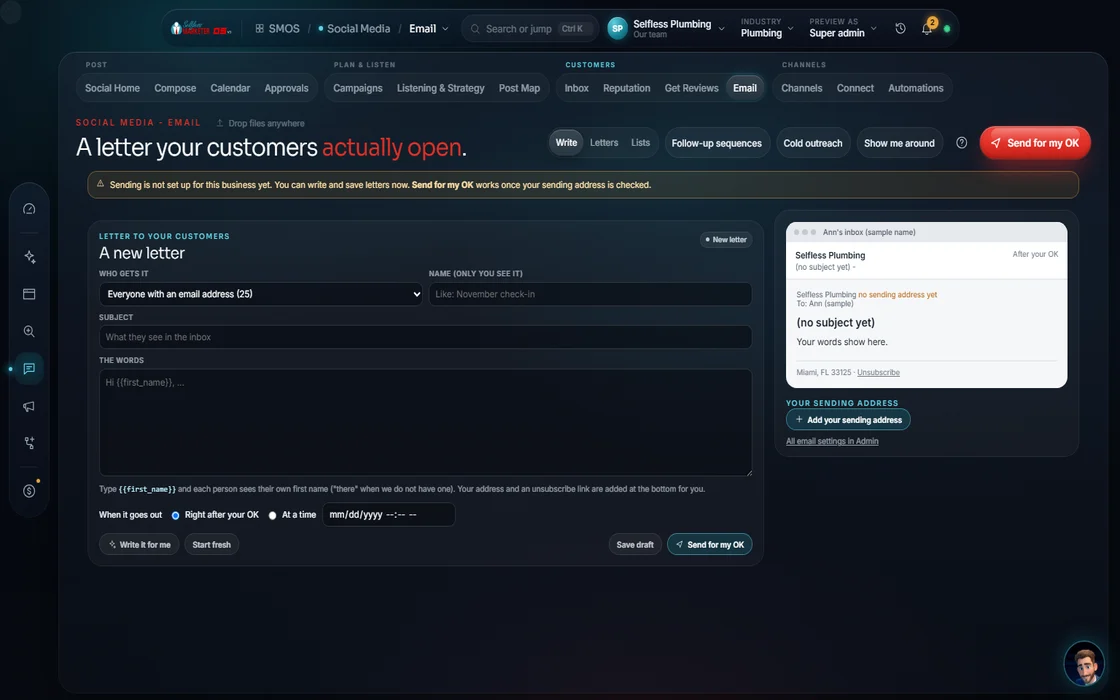 demo business
What it is
Your past customers already trust you
Your cheapest job is a repeat customer. A short monthly email (seasonal tip, real-deadline offer, a reminder) brings them back. A careless blast can land your domain in spam.
We do it carefully. You build lists; your assistant drafts in your voice. Each send runs a preflight: CAN-SPAM footer, one-click unsubscribe, consent on file. A failed check blocks it and shows why. Pass, and you approve it before it queues.
1-to-1 sales email? See Email Outreach. A drip that ends on STOP? See Automation.
Watch it work
3 steps to a safe send, after a 1-time setup
- 01
Set up your sending domain You
1 time, in Settings: DKIM, Return-Path and DMARC, so mail providers trust you. The lane lights up once verified.
- 02
Build a list
Create lists in the Lists tab. A campaign needs at least 1 list to save.
- 03
Draft with your assistant Your assistant
Name the campaign and press Draft an email. Your assistant writes in your voice; you edit and preview.
- 04
Run the preflight
CAN-SPAM footer, one-click unsubscribe and consent. Pass: all guards clear. Fail: blocked, with the list of fixes.
- 05
Approve and queue Approve
Tick “I approve this send.” It records your decision and queues it, the 1 real-money action here.
Everything included
What Email & Newsletter includes
Lists and campaigns
- Lists
- Campaigns
- Draft with AI in your voice
- Inbox preview
- Send-to hand-off to other screens
Safety
- Sending domain check: DKIM, Return-Path, DMARC
- Warm-up ramp 100 / 200 / 400
- CAN-SPAM footer required
- One-click unsubscribe required
- Consent required
- Blocked sends show the fix list
Sending
- “I approve this send” on every send
- Queued, never a blast
- Every send logged
The rules it follows
- Authenticate: DKIM, Return-Path and DMARC set on your domain before anything sends.
- Check: A CAN-SPAM footer and one-click unsubscribe, or the send is blocked. Consent must be on file.
- Approve: A human approval is recorded on every send. Never a synchronous blast.
- Stay clean: Sends go automatic only after authentication, unsubscribe, a postal address and complaints under 0.3% are in place.
- Text too: SMS is A2P 10DLC and TCPA gated; an off-hours or non-consented text is held.
The engines behind it
- Claude: Newsletter drafts in your voice (owned seat)
- Telnyx: Text messages, once your number is approved (metered, asks first)
- See every engine in this group
Who runs it
YOUR TEAM with the OS, or OUR TEAM for you.
- Verify your domain once
- Approve every send
- Keep consent honest when you add contacts
- Drafts the campaign
- Runs the CAN-SPAM and consent preflight
- Queues approved sends on a safe ramp
- Writes email campaigns for Done-For-You clients
- Sets up and verifies your sending domain
- Plans sends around your seasons
Built in. Live once your domain is verified and mail server connected. Scheduled sends stay off on purpose; every send is approved. With Done-For-You, our team sends.
On the way
Coming soon
These are planned and are not in the software yet. We list them so you know what is next.
Write and send newsletters to your list. Each send waits for your OK.
Coming soon: V2Keep going
Related pages
Try the OS
Our free trial is starting soon.
The same tools we use for our done-for-you clients. Our 7-day free trial is starting soon. Until then, book a call and a real person walks you through the OS. $997 a month, first month $497. No contracts.

YOUR TEAM runs it with the OS, or OUR TEAM runs it for you with Done-For-You. Not sure? Which one fits me?