







Content · Engine Room
The right engine for every job. Free first. Paid only when you say.
Every model, tool and engine the OS can call, about 100, with license, speed, quality, cost and lane. Most work runs free.
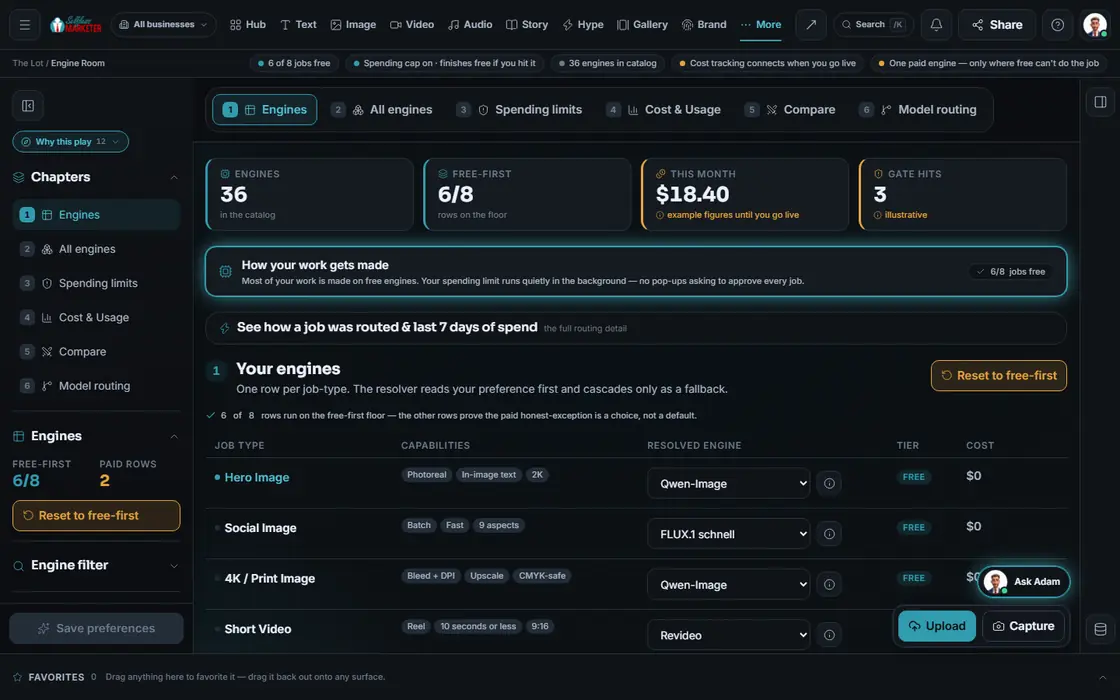 example data
What it is
Under the hood, in plain view
The Engine Room shows what does the work. Each job type (text, images, video, voice, music, phones, search data) has a preferred engine, free by default. Change it, reorder fallbacks, or run a contest.
Each engine has a lane. Text: an owned writing seat and local models, $0 per job. Images, video, voice, music: free engines. Some seats are prepaid. Metered cloud engines are optional; paid use asks first.
No surprise AI bill. Set a spending limit and it's respected quietly: no mid-job pop-ups; a job that would go over finishes on a free engine. Each trigger is logged.
Walk it
The Engine Room in 5 steps
- 01
Made on free engines Free
See exactly which jobs are free. That's the whole point.
example data - 02
Your preferred engines You
Each job type has a preferred engine. Change it; free stays the default.
- 03
Set a spending limit
Set a cap. Hit it, and the job finishes on a free engine.
- 04
Watch your spend
Your spend against the cap, with real numbers once you go live.
- 05
Let engines compete Your assistant
Pick a few engines to compete on one prompt and keep the winner.
Everything included
Everything in the Engine Room
By group
- Text: 9
- Image generation + editing: 25
- Video generation + editing: 24
- Audio: 14
- Avatar / talking head: 6
- Phone / voice AI: 7
- Search / SEO data: 10
- Infrastructure: ~12
Job types
- Hero image
- Social image
- 4K / print image
- Short video
- Long video
- Talking-head video
- Voiceover
- Music with vocals
Lanes
- Local CPU
- Free engines
- Owned seat
- Metered cloud, asks first
Controls
- Preferred engine per job
- Every paid engine waits for your OK first
- Cost & Usage
- Routing log, last 7 days
- License badge on every engine
The rules it follows
- Route: Each job goes primary → fallback → paid → skipped. Paid is never the silent default.
- Cap spend: Each job has a cap and a cheaper fallback. You're never interrupted mid-job to approve a price.
- Charge fairly: Quoted on the sum, charged on what returned, released on cached and skipped work.
- Stay licensed: Engines that aren't licensed for commercial use are blocked before any render.
- Compete: One prompt across up to 6 engines, or 2 head to head.
- Keep a record: See how any job was routed and the last 7 days of spend.
The engines behind it
- ACE-Step / YuE: Free instrumental music (free engine, $0)
- Kling · Veo · ElevenLabs · Seedream · Ideogram: Metered premium engines, each asks first (metered, asks first)
- See every engine in this group
Who runs it
YOUR TEAM with the OS, or OUR TEAM for you.
- Set your spending limit
- Change a preferred engine if you want
- Approve any paid use
- Routes every job free-first
- Finishes on free when a cap is hit
- Logs every route and every dollar
- Picks the best engine for every piece we make
- Keeps your look consistent across engines
- Watches cost on your behalf
Built. Cost tracking shows real numbers once live. Metered engines need a key; paid use asks first. Engine counts are Product facts from the Engine Room manifest and model catalog.
On the way
Coming soon
These are planned and are not in the software yet. We list them so you know what is next.
See which engine made each piece and its cost range.
Coming soon: V2Keep going
Related pages
Try the OS
Our free trial is starting soon.
The same tools we use for our done-for-you clients. Our 7-day free trial is starting soon. Until then, book a call and a real person walks you through the OS. $997 a month, first month $497. No contracts.

YOUR TEAM runs it with the OS, or OUR TEAM runs it for you with Done-For-You. Not sure? Which one fits me?