







SEO & AI Search · Rank Cockpit
Where you rank, from Google's own numbers.
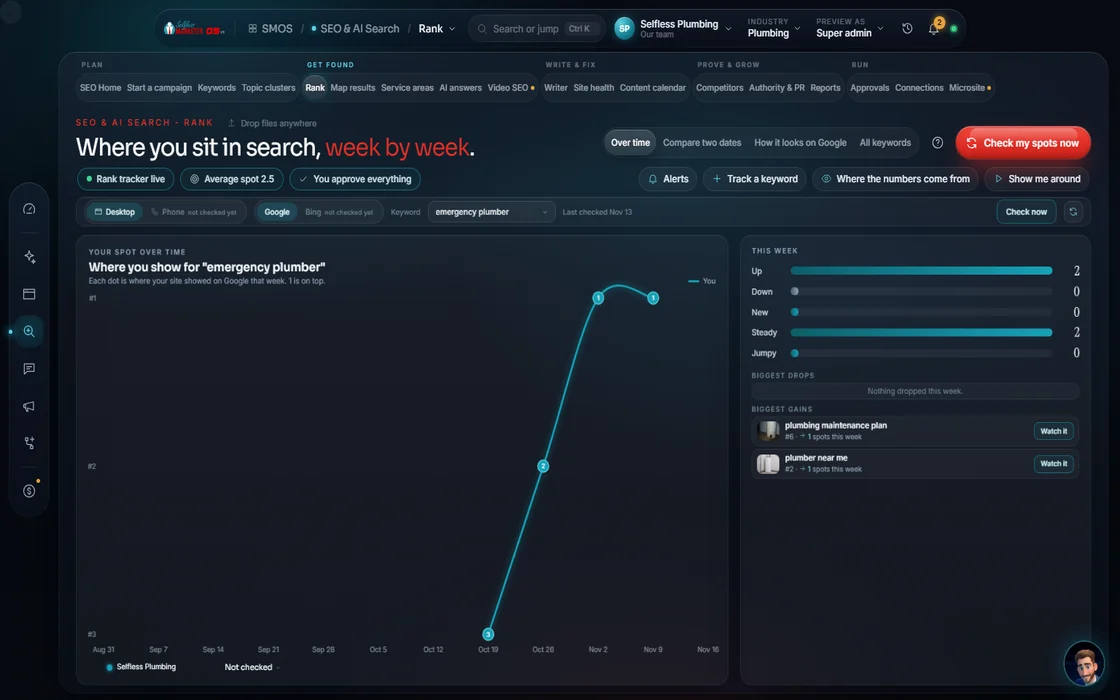
Average position, weekly movers, keywords entering or leaving the top 3. Positions come from Google Search Console; the chart marks when real data began.
 demo business
What it is
Most rank reports are a guess dressed up as a chart
Many tools scrape Google from another state and call it your rank. We use Google Search Console, free and first-party. Until it connects, numbers are labeled estimates on a dotted line; real data turns it solid.
What moved, why it matters, what to do. Position 11 to 20 is striking distance: one refresh from page 1. Keywords sliding past your alert line get flagged before they cost calls.
It also shows which search features each keyword can win: AI Overview, local pack, People Also Ask, featured snippet.
Watch it work
Read your rankings in 5 steps
- 01
Connect Search Console Free
It's free. Connect it to see real positions instead of estimates.
- 02
See this week's movers
Up, down, entered the top 3, left the top 3. Pick 7, 30 or 90 days.
- 03
Set a drop alert You
Tell your assistant the position a keyword shouldn't fall past, and it flags it.
- 04
Try the what-if Your assistant
Simulate a rank gain and see the estimated clicks, from a labeled click-by-position curve.
- 05
Scrub the time machine
Scroll back through 90 days of crawl history. A past frame never changes your data.
Everything included
What the Rank Cockpit includes
Tracking
- Average position
- Movers up and down
- Entered and left the top 3
- Position buckets
- 7, 30 or 90 days
Search features
- Organic
- AI Overview
- Local pack
- People Also Ask
- Featured snippet
- Your brand
Tools
- What-if simulator
- Google result preview per keyword
- Source shown behind every number
Sources
- Google Search Console (free)
- SerpBear
- DataForSEO (metered, asks first)
- Dotted until measured, solid after
The rules it follows
- Rank of record: Positions from Search Console or a connected rank tracker, refreshed weekly. Movements marked only from real measured points.
- Buckets: Where your keywords sit: top 10, 11-20, 21-50, 51-100.
- Quick wins: Striking distance, positions 11-20, flagged for a refresh.
- Defend: A slipping keyword gets an on-page or answer-engine refresh suggested.
- AI status: Each keyword shows if AI answers cite you. “Not cited” links to the Answer Studio.
- Report: Positions, top 3 and top 10 feed your branded report.
Who runs it
YOUR TEAM with the OS, or OUR TEAM for you.
- Connect Search Console (it is free)
- Glance at the movers
- Ask your assistant why anything moved
- Tracks every keyword weekly
- Flags drops and quick wins
- Feeds the report
- Reviews your rankings every week for Done-For-You clients
- Refreshes slipping pages
- Explains every move on your monthly call
Receipts
What real tracking showed
Past client results, documented from each client's analytics and ad accounts. Results vary.
Positions are labeled estimates until Search Console or a rank tracker connects. Past results vary. No ranking promises. Done-For-You works them weekly.
On the way
Coming soon
These are planned and are not in the software yet. We list them so you know what is next.
Your search clicks and views flow in each day once linked.
Coming soon: V2Try a new title and see where it might land (an estimate).
Coming soon: V2Keep going
Related pages
Try the OS
Our free trial is starting soon.
The same tools we use for our done-for-you clients. Our 7-day free trial is starting soon. Until then, book a call and a real person walks you through the OS. $997 a month, first month $497. No contracts.

YOUR TEAM runs it with the OS, or OUR TEAM runs it for you with Done-For-You. Not sure? Which one fits me?