







Guide · Social Media
How to get more reviews the right way.
A steady stream of real reviews, forever. Ask everyone the same way, at the right moment, at a safe pace, and answer every star. In the OS, this lives in the Social Media department.
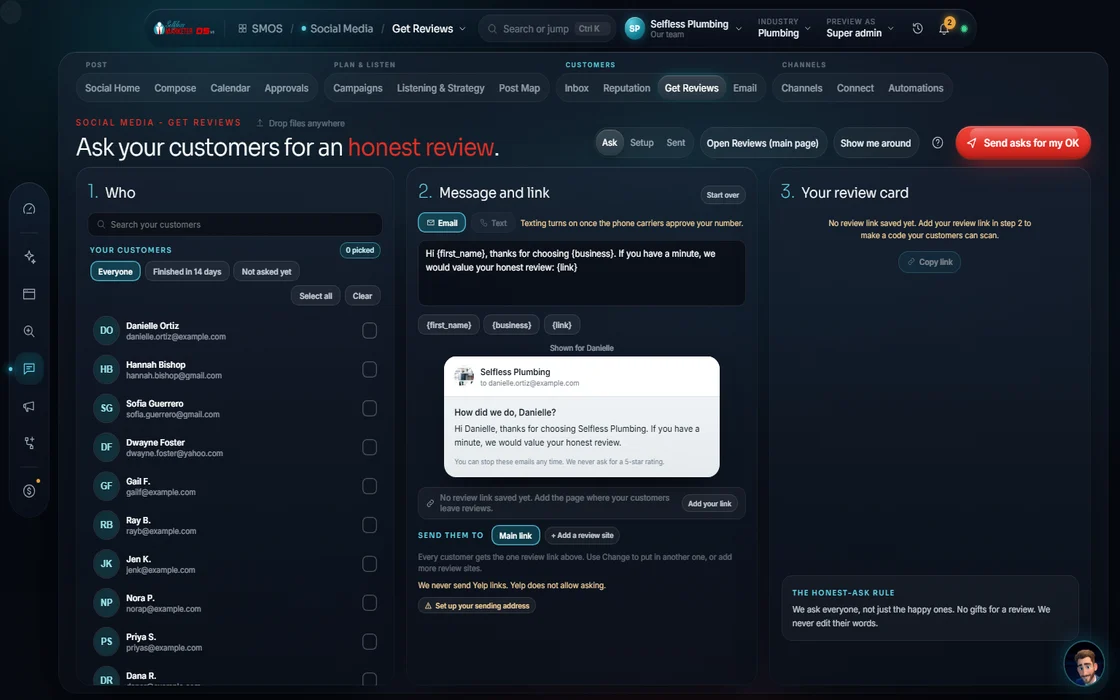 demo business
Why the newest reviews matter most
People don't just count your stars. They check the dates. 74% of consumers want to see reviews from the last 3 months, and 47% skip businesses with fewer than 20 reviews (BrightLocal Local Consumer Review Survey, 2026). A 4.9 with the newest review from last spring loses to a 4.7 with three reviews this week.
Reviews also feed the map and AI answers. Google Business Profile is about 28.6% of local AI citations and Yelp shows up in about 80% of ChatGPT local answers (BrightLocal AI citation study, August 2026). Both run on reviews.
So the goal isn't a burst of reviews. It's a steady stream, forever. This guide shows you how to build it the right way. In the OS, this work lives in the Social Media department on the Get More Reviews and Reputation surfaces, with replies drafted in Reviews & Reputation.
The rules that keep you safe
Break these and you can lose your reviews, your profile or worse. Every one is a rule from Google, the FTC or both:
- Ask everyone the same way. Don't send happy customers to Google and unhappy ones to a private form. That's called gating, and it's not allowed.
- No rewards for reviews. No discounts, gift cards or raffle entries in exchange for a review.
- Never write, buy or trade reviews. Not from friends, not from staff, not from a service.
- Show reviews word for word. If you put reviews on your website, don't edit them, and don't hide the low ones.
These rules are a gift. The businesses that cheat get caught. The ones that ask every customer, every time, win slowly and keep it.
Step 1: Pick where you want reviews
Start with Google. Then add 1 more that matters for your trade: Yelp for most local businesses, or your industry's own site (Angi or the BBB for home services, Zocdoc or Healthgrades for dentists, Avvo for lawyers). Don't scatter across 10 sites. Two strong profiles beat ten empty ones.
One note on Facebook: Meta retired the way outside tools pull Facebook reviews, so they can't be tracked in a dashboard like Google's can. Customers can still leave them; just make Google your main ask.
Step 2: Get your direct review link
Google gives every profile a short link that opens the review box directly. Find it in your Google Business Profile and save it. Make a QR code from it for your invoices, your trucks and your front desk. Add the link to your email signature, your receipts and the thank-you page on your website. The fewer taps between a happy customer and the review box, the more reviews you get.
Step 3: Ask at the right moment
The best time to ask is right after the job, while the customer is happy and the work is fresh. A good rhythm:
- Ask in person, at the end of the job. "Would you mind leaving us a quick review? I'll text you the link."
- Send the text a couple of hours after the job is complete. In the OS, the default flow waits 2 hours after the job, then sends the ask.
- If they don't have text consent on file, send an email instead.
Step 4: Keep the ask short
Long asks get skipped. Here's the shape (a Sample, not a real message):
"Hi Maria, thanks for having us out today. If we did a good job, would you leave us a quick Google review? It really helps a small business like ours: [link]. Thank you. Mike, ABC Plumbing"
Use their name. Name the job. One link. No pressure, no reward.
Step 5: One reminder, then stop
If they don't leave a review, send one gentle reminder a few days later. Then stop. Never more than that. Space your asks at least 72 hours apart for any one person, and honor STOP the moment someone sends it.
Step 6: Keep a steady pace
A sudden spike of reviews can look fake to Google, even when it's real. If you normally get 2 a month, don't jump to 30 in one week. Ramp up slowly. The OS keeps a guard on this: it warns you past about 2.5 times your normal pace and holds the line at 3 times.
Step 7: Answer every review, every star
Replying shows the next customer how you treat people. Answer within 24 hours if you can. Use the table below as your guide: thank the 5-stars by name, and handle the low ones with grace. Never argue in public. Never share private details.
Step 8: Put your reviews to work
A review on Google helps. A review on Google, your website, a post and a short video helps 4 times. Show a live review wall on your site (word for word, all stars shown). Add review schema (the labels search engines read) only for real reviews shown on the page. Turn a great review into a post or a 15-second video, quoted exactly.
Make asking a habit for the whole crew
The owner can't ask every customer. The crew can. Make it part of how every job ends:
- One line everyone says the same way: "If we did a good job today, would you leave us a quick review? I'll text you the link."
- A small card with your QR code left with every invoice or on the counter.
- The text goes out the same way for everyone, so nobody forgets and nobody picks and chooses.
- Share the good ones with the team. When a review names a tech, read it out at the morning meeting. People ask more when they see it matters.
How many reviews do you need?
There's no magic number, but there are 2 useful lines. First, people want recent ones: the newest should be from this month, not last year. Second, 47% skip businesses with under 20 reviews (BrightLocal Local Consumer Review Survey, 2026), so 20 is a good first goal. After that, compare yourself to the top 5 businesses in your area. Our review-gap check shows how far behind or ahead you are.
What about bad reviews?
Every business gets one. Don't panic and don't fight. Reply calmly, own what you can, and take it offline with a direct number. A thoughtful reply shows the next customer how you handle a problem. If a review breaks Google's rules (spam, a fake customer, hate), flag it through your profile; don't threaten the reviewer.
What the OS does for you
The Get More Reviews surface is a 11-step builder (Product fact): where to ask, when to ask, text and email templates with your customer's name and job filled in, a link, a daily cap, 30-day spacing per contact and a lock that blocks reward language. Every review lands word for word in Reputation, with the stars shown, an at-risk queue for the low ones and reply drafts written by star level. Nothing posts until you approve it. Review texts need your phone line and carrier approval (A2P 10DLC, the registration US carriers require for business texting): built in, live for you once your phone line is connected. The Review Velocity campaign runs it all on a 30-day plan.
Reply by star
How to answer every review
The same rules the OS uses when it drafts your replies. You approve every one before it posts.
| Stars | What to do | What to avoid |
|---|---|---|
| 5 stars | Thank them by name and name the service you did. | A copy-paste "Thanks." |
| 4 stars | Thank them, acknowledge the gap, and say what you fixed. | Ignoring the one thing they mentioned. |
| 3 stars | Own the miss and offer a direct line to make it right. | Excuses. |
| 1-2 stars | Apologize without excuses and take it offline with a direct number. | Arguing, or sharing private details in public. |
Product fact: reply drafts by star level are built into Reviews & Reputation. Every review is kept word for word, all stars shown.
How the numbers on this page are labeled: outside stats name their source in the sentence. Counts and rules about the OS are Product facts (what the software does or has). Sample texts are Samples, written to show the shape, not quotes from real customers. Nobody can honestly promise you a ranking, and we don't.
Keep going
Related pages
Try the OS
Our free trial is starting soon.
The same tools we use for our done-for-you clients. Our 7-day free trial is starting soon. Until then, book a call and a real person walks you through the OS. $997 a month, first month $497. No contracts.

YOUR TEAM runs it with the OS, or OUR TEAM runs it for you with Done-For-You. Not sure? Which one fits me?