







Guide · SEO & AI Search
Google Business Profile and the map: what moves it.
Relevance, distance and prominence, and the 10 steps that move the 2 you control. In the OS, this lives in the SEO & AI Search department.
 demo business
What moves the map
When someone searches "[your trade] near me," Google shows a map with a short list of businesses. Google says 3 things decide who shows up there:
- Relevance: how well your profile matches what they searched.
- Distance: how close you are to the person searching.
- Prominence: how well known and trusted you are, online and off. Reviews, links, mentions and listings all count.
You can't move your shop. You can move relevance and prominence, and that's what this guide is about. In the OS, this work lives in the SEO & AI Search department, on the Google Business Profile and Local Map Grid surfaces.
It matters past the map, too. Google Business Profile is about 28.6% of all local AI citations, the number 1 source (BrightLocal AI citation study, August 2026). Fix your profile and you help your AI answers at the same time.
Step 1: Claim it, verify it, and get the name right
Claim your profile at Google and finish verification. Then check your business name. Use your real business name, exactly as it appears on your sign and your paperwork. Don't add your city or a keyword to it ("Joe's Plumbing Littleton Best Emergency Plumber"). It's against Google's rules and can get your profile suspended.
Step 2: Pick the right categories
Your main category is the biggest relevance lever you control. Pick the most specific one that fits what you mostly do ("Plumber," not a vague catch-all like "Point of Interest"). Then add secondary categories for the other real services you offer. Only add what you actually do.
Step 3: Fill in every field
Empty fields are gaps. Fill in all of them:
- Your service area (the towns you cover) and your address if customers visit you
- Phone, website and booking link
- Regular hours, plus special hours for holidays
- A description of up to 750 characters, in plain words, naming your main services and towns
- Every service you offer, with a short description
- Your logo and a cover photo
- Your opening date
Your name, address and phone must match your website exactly.
Step 4: Add real photos, often
Upload real photos of your crew, your trucks, your work and your finished jobs. Never stock. Aim for at least 10 to start, then add new ones every month. Before-and-after shots work well. Use the same real photo on your profile, your website and your listings, so everything tells the same story.
Step 5: Post every week
Google Business Profile posts are free and most of your competitors skip them. Post at least weekly. Use the formats it gives you: an update, an offer, an event or a product. A few rules that work:
- Lead with the local benefit and a clear next step.
- Use the strongest button you can: Call, Book, Get offer.
- Use a real photo. No hashtags.
- Give offers a real end date.
- Keep it short. A post can run up to 1,500 characters, but the first line does the work.
Step 6: Get reviews and answer every one
Reviews are a big part of prominence. Ask every customer the same way, right after the job, and answer every review, every star. The full how-to is in get more reviews the right way.
Step 7: Know what Google took away
Google removed the Questions and Answers section from profiles in fall 2025 and replaced it with AI "Ask" answers in the Maps app. Google Business chat shut down on July 31, 2024. So the answers customers want have to live in your description, your services, your posts and your website. If your profile doesn't say it, the AI answer may not either.
Don't skip Apple and Bing
Google isn't the only map. In 2026, 27% of consumers used Apple Maps for local recommendations, up from 14% (BrightLocal Local Consumer Review Survey, 2026). Apple Business replaced Apple Business Connect in April 2026, and Apple Maps feeds Siri. A new Bing Places launched in October 2025, and Bing feeds Microsoft Copilot. Claim both, fill in every field the same way you did on Google, and add the same real photos. It takes an afternoon, and most of your competitors haven't done it.
Step 8: Make your listings match everywhere
Google checks other sites to confirm you're real. Think in 3 tiers:
- Tier 1, moves the map: Google Business Profile, Bing Places, Apple Business (Apple Maps), Yelp and Facebook.
- Tier 2, the data companies: Data Axle, TransUnion (formerly Neustar Localeze), Foursquare and Nextdoor. Fixing these fixes dozens of smaller directories downstream.
- Tier 3, your industry: Angi, the BBB, Thumbtack, HomeAdvisor, Yellow Pages and the directories that matter for your trade.
Same name, address and phone, letter for letter, on every one.
Step 9: Give every town and service its own page
Google wants to send people to the page that matches their search. Build one page on your website for each service in each town you really serve: "drain cleaning in Englewood," "water heater repair in Centennial." Each page needs its own intro (not the same page with the town name swapped), your name, address and phone, a map and LocalBusiness schema (the labels search engines read). Thin copy-paste pages can hurt you. See what a local website needs.
Step 10: Measure with a grid, not one search
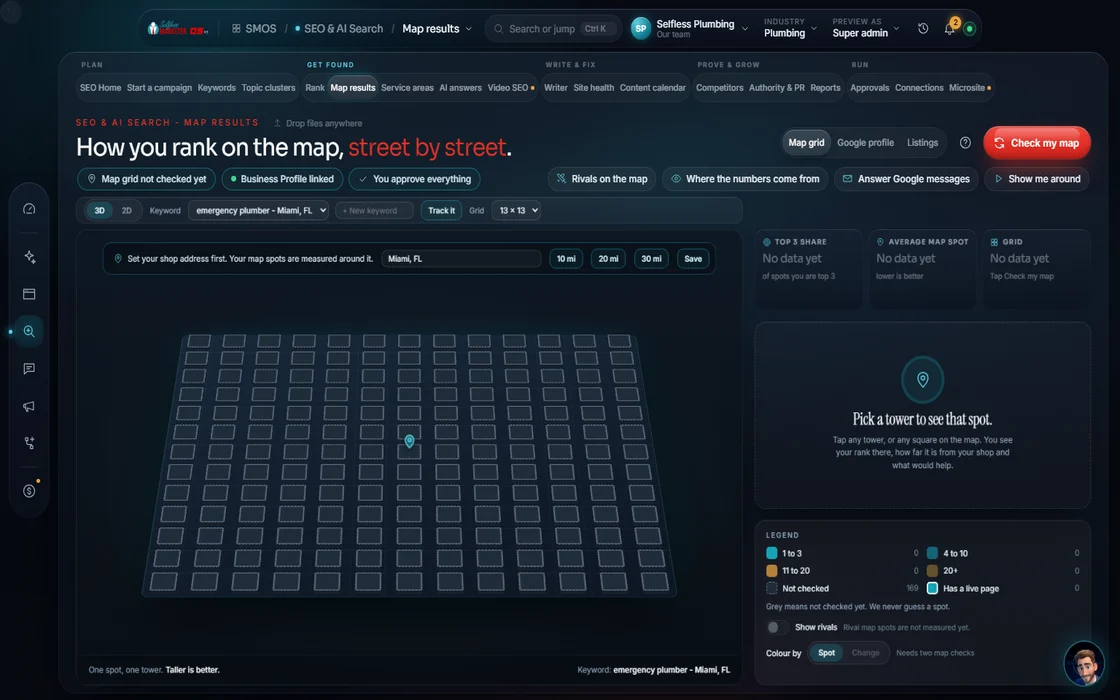
Your map rank changes block by block. If you search from your shop, you'll look great. A customer 8 miles away may not see you at all. A geo-grid scan checks your rank from dozens of points across your service area and shows it as a heat map. Look for the weak spots, then ask why: is it relevance, distance or prominence? A weak spot far from your shop often needs a page for that town and reviews from customers there.
A 15-minute weekly routine
Most of this is set-and-maintain. Once your profile is complete, a short weekly habit keeps it moving:
- Monday: post one update or offer with a real photo from last week's work.
- Tuesday: upload 2 or 3 new photos of real jobs.
- Wednesday: answer every new review, every star.
- Thursday: check your hours, especially before a holiday.
- Friday: look at your profile's numbers: calls, website clicks and direction requests. Note what moved.
Once a month, run your map scan again and compare. Once a quarter, read your description and services out loud and update anything that changed.
What not to do
- Don't stuff keywords into your business name.
- Don't list a fake address or a virtual office to look closer.
- Don't buy reviews, write your own, or only ask the happy customers.
- Don't post the same text every week. Real work, real photos, real offers.
What the OS does for you
The Google Business Profile surface audits every field, checks your name against the keyword-stuffing rule, suggests categories from the searches you track, and checks every post against Google's limits before it goes out. The Local Map Grid shows your rank across your whole service area (5, 15 or 30-mile rings), tells you why a weak spot is weak, and builds that spot's page in one click. Listings & Citations compares your name, address and phone across every directory. Live rank data turns on once your rank source and profile are connected; until then, the screens say "estimate." The Map Pack Domination campaign runs the whole plan over a month, then checks where you show on the map so you can see the change.
30-day plan
Map Pack Domination, day by day
GBP audit
Fix categories, services, hours, photos; record the before-score
NAP sheet
Push one consistent name/address/phone to the aggregators
GBP post
Offer post with a photo of real work
Review ask batch
Same public review ask to every recent customer
GBP post
Service spotlight post
Location page
A real page per city you serve (no city-swap doorway pages)
GBP post
Before/after post
Review reply
Reply to every review, every star
Answer block
Publish answer blocks for the top 5 cost/how-to questions
GBP post
Seasonal tip post
Rank grid
Check where you show on the map and send a short update
The template's dated touches. The OS tailors each one from your Brand DNA and the platforms you have connected; nothing goes out until you approve it. Product fact
Questions
Google Business Profile questions owners ask
Can you guarantee me a spot in the top of the map?
No, and be careful of anyone who does. Nobody controls Google's map. What you can control is a complete profile, real photos, weekly posts, steady reviews and matching listings.
How often should I post on my Google Business Profile?
At least once a week. Offers with a real end date, updates with real photos, and answers to the questions customers ask. More in Google Business Profile posts.
I work from home. Do I have to show my address?
No. Set a service area with the towns you cover and hide your address. Never list a fake address to look closer.
Why do I rank well at my shop but not across town?
Distance is one of Google's 3 factors. A page for that town on your site, plus reviews from customers there, helps the weak spots. A geo-grid scan shows you exactly where they are.
How the numbers on this page are labeled: outside stats name their source in the sentence. Counts and rules about the OS are Product facts (what the software does or has). Past client results are Real, documented, and results vary. Nobody can honestly promise you a ranking, and we don't.
Keep going
Related pages
Try the OS
Our free trial is starting soon.
The same tools we use for our done-for-you clients. Our 7-day free trial is starting soon. Until then, book a call and a real person walks you through the OS. $997 a month, first month $497. No contracts.

YOUR TEAM runs it with the OS, or OUR TEAM runs it for you with Done-For-You. Not sure? Which one fits me?