







Guide · Paid Ads
Paid ads for local businesses: where to start.
Paid ads are like turning on a faucet. Here's how to make sure the water lands in your bucket: which platform first, the page, the tracking, the area, the cap and the only number that matters. In the OS, this lives in the Paid Ads department.
 example data
The faucet and the garden
Paid ads are like turning on a faucet. SEO is the garden. Ads can bring calls this month; the garden feeds you for years. Most local businesses need both: the faucet while the garden grows, and the faucet again when you have open slots to fill.
The danger with ads is that the faucet runs whether the water lands in your bucket or on the floor. This guide shows how to start so every dollar has a job and you can see what it earned. In the OS, this work lives in the Paid Ads department, from the Launch Builder to ROI.
Start where people are already looking
The cheapest customer is the one already searching for what you do, right now. So start with the high-intent ads, then add the rest:
- Google Local Services Ads (the ones with the Google badge at the very top). You pay per lead, not per click, and you can dispute junk leads for a credit. Google is moving Local Services Ads management into Google Ads from August 2026 through 2027 (Search Engine Land, 2026). Not every trade or city qualifies, so check yours first.
- Google Search ads, one per service and city: "emergency plumber Littleton," "AC repair Pearland."
- Microsoft Ads (Bing), the same searches with less competition.
Once those are running and tracked, add the ads that find people before they search: Facebook and Instagram, Nextdoor, YouTube. And retargeting, which shows an offer to people who already visited your site.
Step 1: Fix the landing page first
Never send an ad to your home page. Send it to a page that matches the ad: the same service, the same town, the same offer. One promise and one action per page, the phone number at the top, a short form, and a trust row under the button. An ad that brings someone to the wrong page pays for the click and loses the customer.
Step 2: Track every call before you spend a dollar
Many local customers call instead of filling out a form. If you can't tell which ad made the phone ring, you're guessing. Give each campaign its own tracking number, and record what happened on each call: booked, price-checker, wrong area, spam. In the OS, Call Intelligence does this and routes every call into your CRM.
Step 3: Draw a tight service area
Every click from outside your service area is money spent on someone you can't serve. Set your area to where you actually want to work. A tighter radius spends less on out-of-area clicks. Then exclude the people who won't buy: job seekers, people outside your area, and your existing customers (unless the ad is for them).
Step 4: Pick buyer words, and block the rest
Choose search terms that show someone ready to hire: "near me," "cost," "emergency," "repair," "install," "quote." Then block the words that waste money: "jobs," "salary," "how to do it yourself," "free." Check the search terms report every week and keep blocking.
Step 5: Set a monthly cap, and approve every dollar
Decide the most you'll spend this month, and set it in the platform. Then watch the pace. If you're halfway through the month and 80% through the budget, something needs to change. Check it at least twice a week in the first month, when mistakes are most likely: a wrong setting, a missing blocked word, an area drawn too wide. In the OS, every spend action waits for your approval in the Spend Gate, with a pacing gauge against your monthly cap. You approve every dollar.
Step 6: Watch lead quality, not just the number of leads
20 calls a day sounds great, until you find out 10-12 were tire kickers, 3-4 were price-checkers without the budget, and only 1-3 paid. That's a lead-quality problem, and more budget won't fix it. Tighten the area, sharpen the words, change the offer. On Local Services Ads, dispute the junk: spam, wrong area, not a real customer, duplicates and jobs outside your trade can be disputed for a credit.
Step 7: Test your ads, then make more like the winner
Run 2 or 3 versions of each ad at once: different headlines, different photos, different offers. Let them run long enough to see a winner, then pause the losers and make more like the winner. Size your images for every placement: square (1:1), tall (9:16), feed (4:5) and wide (16:9).
Step 8: Judge ads by revenue, not clicks
The only number that matters is what the ads earned. Trace each one from spend, to lead, to booked job, to money in the bank. Compare channels by return on ad spend (revenue divided by what you spent). Move budget toward what's returning, away from what isn't.
Retargeting: the second chance
Many people who visit your website don't call on the first visit. Retargeting shows them a reminder later: a short video, a real review, a seasonal offer. Put the tracking pixels on your site (Google, Meta and Nextdoor each have one), build an audience of recent visitors, and show them something new, not the same ad again. Keep the area tight and the time window short; someone who looked at water heaters 6 months ago probably already bought one. And follow the privacy rules: tell visitors you use these tools in your privacy policy.
Mistakes that burn ad money
- Sending every ad to the home page. Match the page to the ad.
- No call tracking. You'll never know which ad paid for itself.
- An area that's too wide. You pay for clicks you can't serve.
- No blocked words. "Jobs" and "how to" searches eat budget fast.
- Boosting posts with no goal. A boost isn't a campaign. Decide what you want first: calls, forms or visits.
- Changing everything at once. Change one thing, wait, measure, then change the next.
- Calling it after 3 days. Give a campaign enough clicks to learn before you judge it.
- Slow follow-up. A form lead from an ad is hot for minutes, not days. See never miss a lead.
How much should you spend?
It depends on your trade, your town and how many jobs you can take. Our ad budget planner helps you work it out from your own numbers. If you hire someone to manage ads, know how they charge: management fees run 10-20% of ad spend (some 25-30%), or $750-$5,000 a month flat, plus setup of $500-$2,500 (published prices and dated third-party trackers, October 2026). Ask whether they get paid more when you spend more.
What the OS does for you
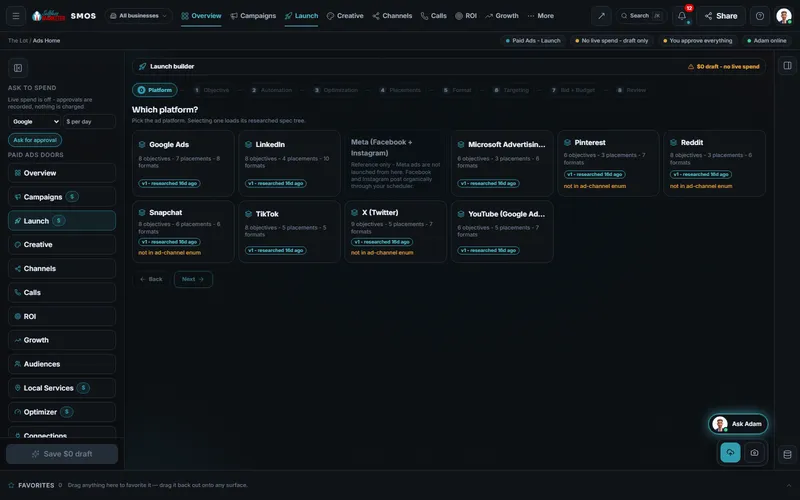
The Launch Builder walks you through 8 steps for each platform, built on that platform's real rules, and ends in a $0 draft. Nothing spends until you approve it and connect your ad account. The Creative Studio sizes your ads for every placement and grades the copy. Local Services Ads gives you the lead queue with one-tap disputes. ROI traces spend to revenue, with every number labeled measured or estimated. Facebook, Instagram and Yellow Pages ads are run by hand by our Done-For-You team; in the OS on its own, they show as coming soon. On Done-For-You, $500 a month of ad spend is included.
Which platform
What each ad platform is good for
| Platform | Best for | Where to start |
|---|---|---|
| Google Local Services Ads | Google-badged leads, pay per lead | First, if your trade and city qualify |
| Google Ads (Search) | High-intent searches, right now | First or second |
| Microsoft Ads | The same intent, less competition | Once Google is tracked |
| YouTube Ads | Video: being known before they need you | When you have a short video |
| Meta Ads (Facebook + Instagram) | Local offers, retargeting, lead forms | Run by hand by our Done-For-You team |
| Nextdoor Ads | Neighborhood reach | Strong for home services |
| TikTok Ads | Short-video discovery | When you have creator-style video |
| LinkedIn Ads | Commercial and business buyers | For B2B work |
| Yellow Pages Ads | Directory searchers | Run by hand by our Done-For-You team |
Product fact: the OS carries a researched spec for each platform's objectives, placements and creative limits. Meta and Yellow Pages ads are Done-For-You only.
The receipts
Past paid-ads results, documented
Past client results, documented from each client's analytics and ad accounts. Results vary.
How the numbers on this page are labeled: outside stats and prices name their source in the sentence. Counts and rules about the OS are Product facts (what the software does or has). Past client results are Real, documented, and results vary. Where we say "in our experience," that's our view from years of doing this, not a study. Nobody can honestly promise you a ranking, and we don't.
Keep going
Related pages
Next step
Let's figure out where you are, and where you want to be.
A Free Strategy Session, 30 minutes, with a real person. We check your territory, show you exactly what's costing you customers and map out your plan. No pressure. No hard sell. No catch.

YOUR TEAM runs it with the OS, or OUR TEAM runs it for you with Done-For-You. Not sure? Which one fits me?