







Content · The Finishing Bay
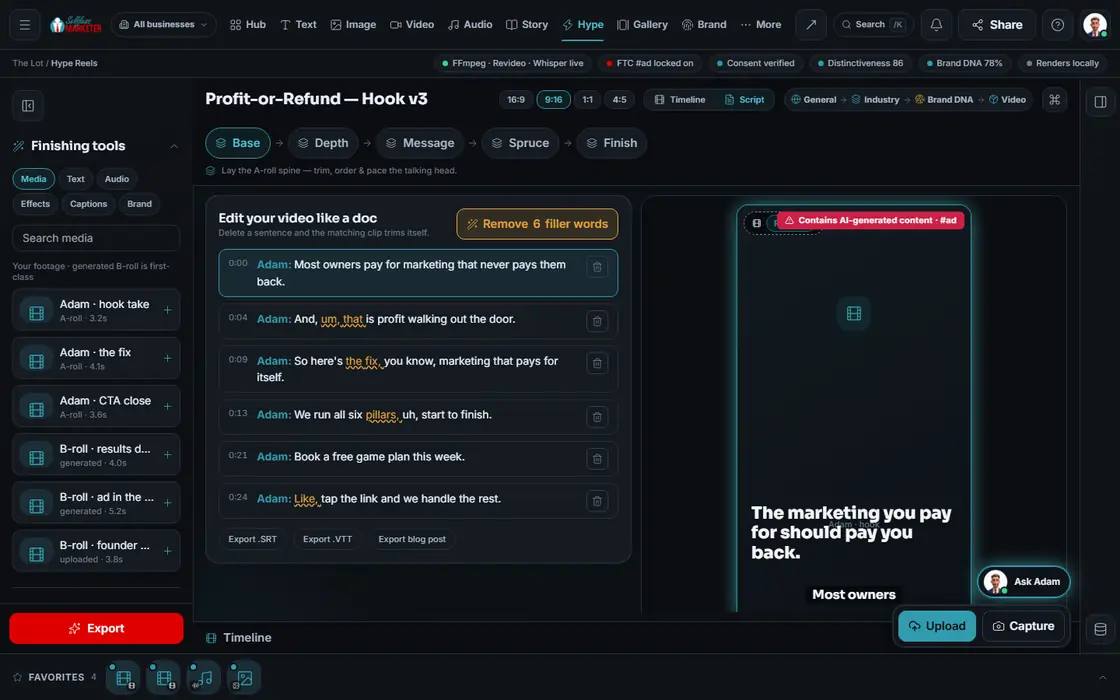
Edit your video like a doc. Plan the cut from the transcript.
The OS video editor. Use transcript or timeline, or tell your assistant: “cut dead air”, “add captions”, “reframe for vertical”. You see the plan before it cuts.
 example data
What it is
Post-production without the learning curve
The Finishing Bay, our most fully wired studio, finishes rough clips. Edit by transcript: delete a sentence and its clip trims itself. Cut “um” and “you know” as an undoable change.
Video editors are hard; most owners quit after one try. Here you say the edit, your assistant plans it, you press Apply. Nothing changes until then.
For phone filmers, crews shooting walk-throughs, and anyone needing a reel, Short and Google Business clip from one video.
Walk it
From rough cut to finished in 6 steps
- 01
Your preview screen
Your clip loads with the voice-over word-timed.
example data - 02
Edit like a doc You
Delete a sentence and its clip trims itself. Filler words come out as an undoable diff.
- 03
Timeline or script
Flip between the 7-track timeline and the script, whichever suits the edit.
- 04
Tell your assistant the edit Your assistant
Cut dead air, add captions, tighten the hook, fix pacing, reframe for vertical. Review, then Apply.
- 05
Fine-tune a clip
Grade, transitions, overlays and the audio mix. The #ad label and consent stay clear for you.
- 06
Finish it Approve
Export a clean master, or send it to the Screening Room or the Gallery.
Everything included
Everything in the Finishing Bay
Tracks
- V1 main (A-roll)
- V2 B-roll
- V3 titles / overlays
- A1 music
- A2 sound effects
- A3 voice-over
- CC karaoke captions
Look
- Grades: Navy Cinematic, Cabernet Editorial, Warm Minimal
- Real color controls
- Transitions: dip to color, whip pan, zoom punch, luma wipe, morph cut
- Beat grid snapped to the music
- Keyframe curves
Pacing presets
- Punchy
- Breathing
- Hook-first
- B-roll rich
- Sound-off optimized
Platform presets
- Instagram Reel: 6-90 seconds
- YouTube Short: up to 60 seconds
- TikTok: up to 3 minutes
- YouTube: wide, long form
- Google Business Profile: up to 30 seconds
- Paid ad: square, 6 / 15 / 30 seconds
Export
- MP4 (H.264)
- MOV (ProRes)
- WebM
- GIF
- SRT, VTT and TXT captions
- Cuts battle: pick the best cut
The rules it follows
- Cut dead air: Finds gaps longer than 0.4 seconds and closes them; trims fragments under 1 second.
- Caption it: Word-timed captions, karaoke style, plus SRT and VTT files.
- Speed it up: About 15% tighter cuts, a zoom-punch on each hit, the talking head at 1.1×.
- Go vertical: Tracks the subject to 1080 × 1920 and re-centers titles in the safe zone.
- Mix the sound: Music auto-ducked to 15% or less under the voice; master at −16 LUFS; voice denoise.
- Brand it: Lower-thirds, phone-number bar, logo sting, end-card CTA, brand color wipe.
The engines behind it
- Whisper: Word-timed transcription for edit-by-text and captions (free engine, $0)
- FFmpeg: Every encode, trim and per-platform export (local, $0)
- Real-ESRGAN: AI upscale on export (free engine, $0)
- Higgsfield: Reframe and upscale (owned seat)
- See every engine in this group
Who runs it
YOUR TEAM with the OS, or OUR TEAM for you.
- Send the clip
- Say the edit or make it
- Confirm the on-screen claims and export
- Transcribes and plans every edit
- Mixes, captions and reframes
- Checks consent, claims and the #ad label
- Edits your short and long form videos
- Cuts reels and Shorts from every shoot
- Adds your brand to every video
The Finishing Bay transcribes your footage and plans the cut. Exporting your edited video is on the way.
On the way
Coming soon
These are planned and are not in the software yet. We list them so you know what is next.
Delete a sentence in the text and the video trims itself.
Coming soon: V2Plan a polished one-take edit; nothing paid runs without your OK.
Coming soon: V2Keep going
Related pages
Try the OS
Our free trial is starting soon.
The same tools we use for our done-for-you clients. Our 7-day free trial is starting soon. Until then, book a call and a real person walks you through the OS. $997 a month, first month $497. No contracts.

YOUR TEAM runs it with the OS, or OUR TEAM runs it for you with Done-For-You. Not sure? Which one fits me?