







Content · Video Studio
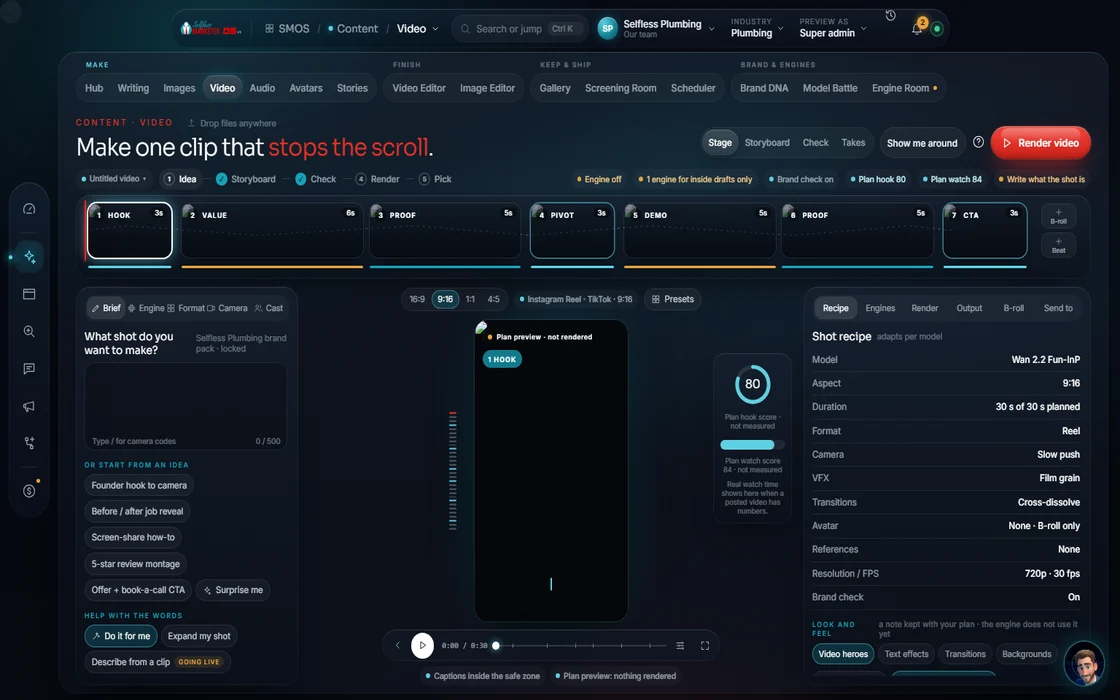
Describe the shot. See the whole video before it renders.
17 formats, from a 15-second promo to a site walk. Camera moves, effects, captions, music and voiceover built in. Planning is free; video rendering is switching on soon.
 demo business
What it is
Plan the video before you pay for it
Video Studio turns a line or two into a planned video. Pick a format, describe the shot or tap “Do it for me”. You get a storyboard (hook, value, call to action) checked for a real story beat.
Most owners know video works but never make it: too slow, too costly. Here planning is free. The cheapest floor is a captioned slideshow of your job photos with music. Add camera moves, effects or an avatar later.
It's for owners who'd rather send job pictures and videos than sit in an editor. The studio does the rest.
Walk it
From a line to a video in 6 steps
- 01
Describe your shot Your assistant
A line or two, or tap Do it for me and your assistant drafts the whole thing.
example data - 02
Pick the format and moves
17 formats. Stack up to 3 camera moves and up to 3 effects. Paint where motion happens.
- 03
Free engine first Free
Your video is planned on the free engine first. No credits are spent unless you choose.
- 04
Your video preview
See the storyboard: hook, value, CTA, with your assistant on camera under a third of the time.
- 05
Render your video Approve
When the plan looks right, render. Battle a few engines first if you want the best cut.
- 06
Finish and send
Caption it in the Finishing Bay, or send it straight to the Screening Room.
Everything included
Everything in Video Studio
Formats
- Ad / commercial
- Product spotlight
- How-to / tutorial
- Story / narrative
- Social short
- Promo / offer
- Before / after (split-screen wipe)
- POV site walk
- Montage
- Myth / fact
- Slideshow from real job photos
- Talking head / avatar
- Storyboard (multi-beat)
- Testimonial
- Explainer
- Cinematic
- Bright UGC
Camera moves
- Slow push, orbit, crane, drone reveal, handheld
- Whip pan, rack focus, dolly, static, pull-out
- Pan, boom, tilt, zoom, aerial 360
Effects
- Light leaks, film grain, halation, bloom
- Chromatic aberration, vignette, letterbox
- Lens flare, dust, light rays
Controls
- First / last-frame storyboarding
- Frames per second
- Motion strength
- Seed lock
- Brand lock
- Motion-Brush
The rules it follows
- Pick the format: Ads get the FTC #ad label forced on, and it can't be hidden.
- Tell a story: A but/therefore beat check gates every render, even on the free floor.
- Hold attention: Your assistant or a presenter on camera under a third of the time; B-roll the rest.
- Shoot virtually: 35, 50 or 85mm lenses, f2.8 and a focus pull on the subject. First and last frame can be set.
- Add the layers: Karaoke captions with SRT/VTT files; music about 15% under the voice.
- Hand it on: Sends the recipe and parts, not a flat file, so the next studio can edit it.
The engines behind it
- Wan 2.2: The free motion floor: image-to-video (free engine, $0)
- LTX-Video: Fast generative motion (free engine, $0)
- Higgsfield Cinema (planned): 4K / 50fps with native audio (owned seat)
- Veo 3.1 (planned): Flagship generative video (metered, asks first)
- Seedance (planned): Prompt-only video (metered, asks first)
- See every engine in this group
Who runs it
YOUR TEAM with the OS, or OUR TEAM for you.
- Send real job photos and clips
- Approve the storyboard
- Approve any paid render
- Drafts the storyboard
- Checks the story beats
- Plans free and hands it on
- Short and long form videos
- Quarterly on-site professional video
- Video for ads, posts and your website
Built: formats, camera, effects, storyboard, free plan. Video rendering is switching on soon; paid engines are labeled with their price. With Done-For-You, our team makes your videos now.
On the way
Coming soon
These are planned and are not in the software yet. We list them so you know what is next.
Long pauses and dead air get cut for you.
Coming soon: V2A live timeline and storyboard so you can see the whole video.
Coming soon: V2Choose how a clip starts and ends.
Coming soon: V2Add pans, zooms and sweeping moves to a clip.
Coming soon: V2Get short clip ideas from one long video.
Coming soon: V2Titles, charts and captions timed to what is said.
Coming soon: V2Keep going
Related pages
Try the OS
Our free trial is starting soon.
The same tools we use for our done-for-you clients. Our 7-day free trial is starting soon. Until then, book a call and a real person walks you through the OS. $997 a month, first month $497. No contracts.

YOUR TEAM runs it with the OS, or OUR TEAM runs it for you with Done-For-You. Not sure? Which one fits me?