







AI Automation · Jobs & Dispatch
From the call to paid. On one board.
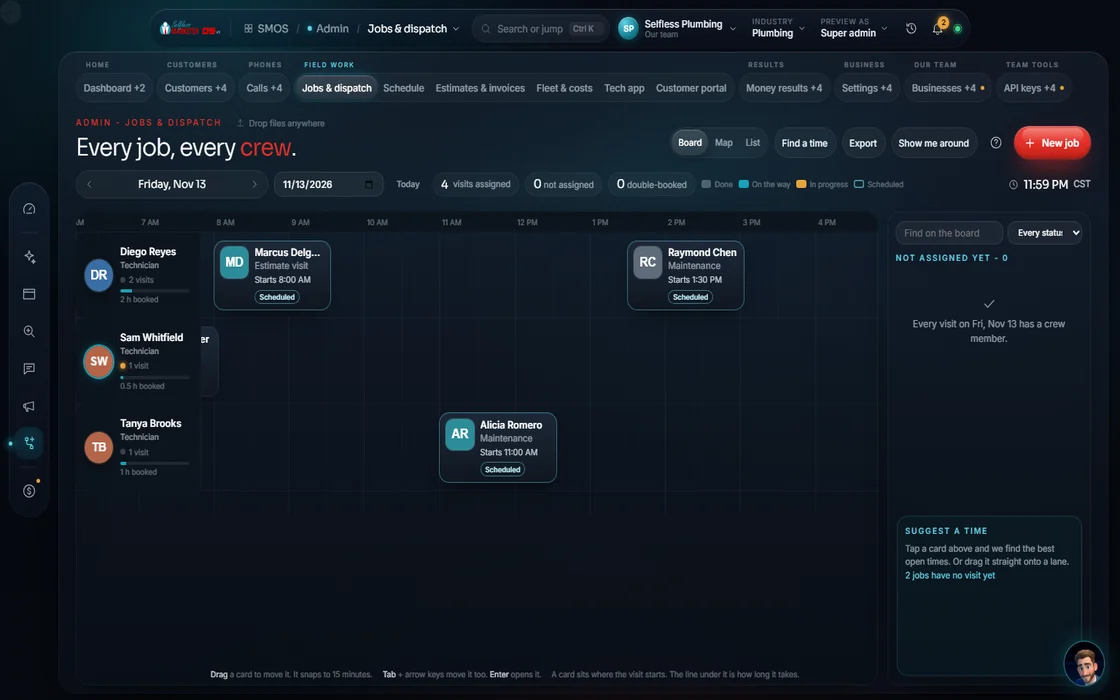
Intake → estimate → dispatch → invoice → paid. Jobs & Dispatch closes the money loop: techs on a time grid, good/better/best estimates signed online, invoices that close the job.
 demo business
What it is
The revenue loop, one board
Each tech gets a row on a time grid. Drag a job to reschedule and the right alerts fire. Jobs move through new, scheduled, in progress, complete, invoiced, paid or canceled, each numbered in your brand's sequence.
Estimates come in 3 tiers with financing per tier. With offers and proof (warranties, certifications) in Brand DNA, each gets a cover note in your voice. Customers sign in the Customer Portal; one click invoices it.
- On-site photos come in from the Technician App
- A board view by tech and by dispatch state: red needs action, green is paid
Walk the loop
One job, start to paid
- 01
Take a job You
Log it and put it on the board. The mouth of the revenue loop.
- 02
Find a time Your assistant
Open times from your calendar.
- 03
Build the estimate Your assistant
Good / better / best with proof, financing and e-sign.
- 04
See the day You
Every tech's lane on a time grid. Drag to assign or reschedule.
- 05
Customer signs Approve
They pick a tier and sign in the portal; the job flips to accepted.
- 06
Get paid You
Convert the estimate to an invoice, take payment, close the loop.
Everything included
What Jobs & Dispatch holds
Board
- Tech rows × real time grid
- Drag to assign or reschedule
- Find-a-time from your calendar
- Board by tech and by dispatch state
- Job states: new, scheduled, in progress, complete, invoiced, paid, canceled
- Per-brand job numbers
Money
- Good / better / best estimates
- Financing per tier
- Cover note from Brand DNA
- Estimate → invoice
- Payments (test mode until live keys)
- Margin per job
Set up
- Job photos from the field
- ESIGN/UETA signature record
The rules it follows
- Sign: The customer signs online with an ESIGN/UETA audit trail.
- Prove the work: On-site photos from the tech app attach to the job.
Who runs it
YOUR TEAM with the OS, or OUR TEAM for you.
- Take jobs and assign techs
- Approve estimates before they go
- Close the invoice
- Keeps the board on real time
- Builds the 3-tier estimate
- Turns signed estimates into invoices
- Connects payments and booking
- Fits the loop to your sales process
Live payments turn on once your payment keys connect; until then, test mode, no real money. With Done-For-You, we set it up.
On the way
Coming soon
These are planned and are not in the software yet. We list them so you know what is next.
Move jobs on a live timeline.
Coming soon: V2Keep going
Related pages
Try the OS
Our free trial is starting soon.
The same tools we use for our done-for-you clients. Our 7-day free trial is starting soon. Until then, book a call and a real person walks you through the OS. $997 a month, first month $497. No contracts.

YOUR TEAM runs it with the OS, or OUR TEAM runs it for you with Done-For-You. Not sure? Which one fits me?