







Paid Ads · Campaigns
Every campaign, paced to your cap. You approve every dollar.
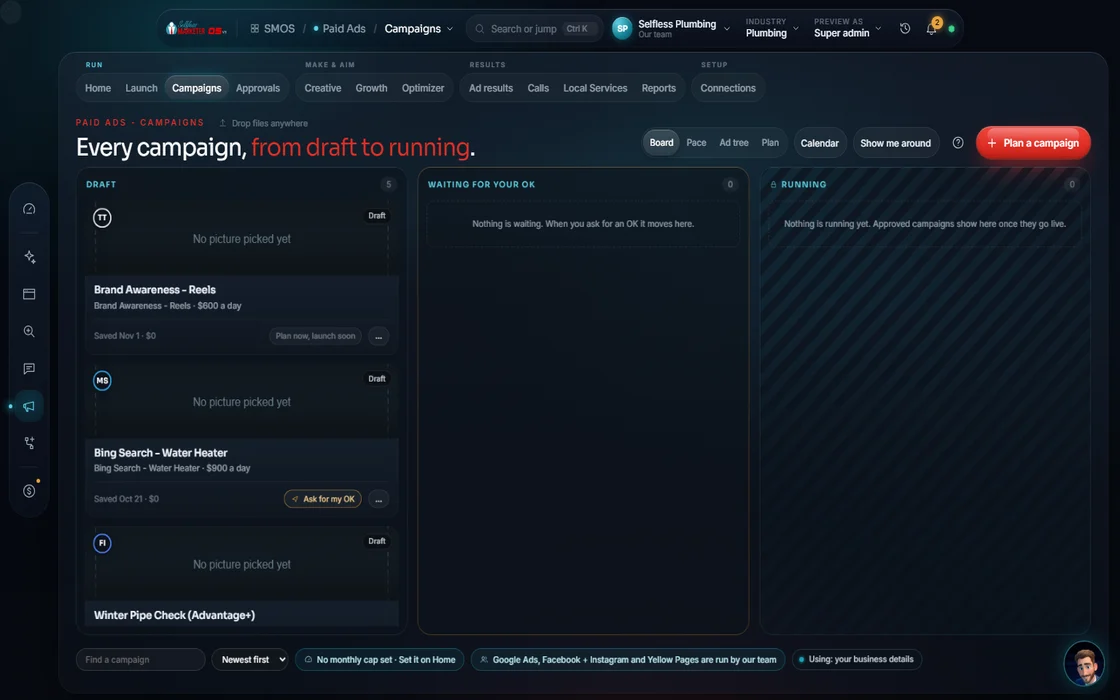
Paid ads are like turning on a faucet. The Campaigns cockpit is the handle: what's running, spend pace against your monthly cap, your assistant's suggestions. Nothing moves until you say so.
 demo business
What it is
The handle on the faucet
Most owners learn of overspend from the card statement. Here each campaign gets a bar pacing against your monthly cap. A tick marks today's expected spend; a bar past it is over-pacing and glows.
Below is the roster with channel, objective and status. Trend lines appear once your ad account syncs. With no account, it says: "No active campaigns. Plan one below to see its pacing here." Nothing invented.
Part of Paid Ads, the 4th of our 6 services: Website → Social → SEO → Paid Ads → Content → AI Automation.
- One gauge: spend against your monthly cap
- A ranked "what needs you today" list (severity × 3 + value × 2 + recency)
- Budget-shift ideas only from real returns by channel
- Every spend action sits behind your approval
Walk the screen
How a morning in the cockpit goes
One decision at a time. The ad wording starts from your own offer; you add your ZIP, a service radius and the budget.
- 01
Pick a lane You
Launch, ROI, Growth or Manage. "Manage what is live" opens this cockpit.
- 02
Read the gauge Your assistant
Active spend against your monthly cap, in one number. See at a glance if the month is on track.
- 03
Work the attention list Your assistant
Ranked cards: a campaign over-pacing, spend not yet traced to booked jobs, a channel worth more budget.
- 04
Open the roster You
Campaign › ad set › ad with cost per lead, return on spend, spend, click rate, cost per click, frequency and conversions.
- 05
Check each pace bar Approve
Past the tick means over-pacing. You can pause the weakest or let it run.
- 06
Accept or reject a shift Approve
"Google returns 3.1× vs Meta at 1.8× this month" (Sample). Accepting spends money, so it waits for your OK, one shift at a time.
- 07
Plan the next campaign Free
Your assistant drafts a $0 plan from your Brand DNA, then hands it to the Launch Builder.
Everything included
What is on the screen
Pacing
- Spend-vs-monthly-cap gauge
- Per-campaign pace-to-cap bars
- Today's expected-pace tick
- Over-pacing halos
- Pause the weakest
Roster
- Campaign roster
- Channel, objective and status columns
- Trend lines once your ad account syncs
- Cost per lead, return on spend, spend, click rate, cost per click, frequency, conversions
- Vendor sync status
Decisions
- Ranked attention list
- Budget-shift suggestions from measured returns
- Accept or reject, one at a time
- Rules that notify only
- Dry run that reads real numbers and fires nothing
Around it
- 4 lanes: Launch, ROI, Growth, Manage
- $0 campaign plans from Brand DNA
- Every spend request in the one approvals queue
- Your assistant's quick questions on every screen
The rules it follows
- Plan: A $0 plan from your Brand DNA. Planning is free; spend is only ever authorized at launch, behind approval.
- Pace: Each campaign is compared to the pro-rated monthly cap. Over-pacing gets a halo.
- Shift budget: Suggested only when the best and worst channels are more than 1.3× apart in measured return.
- Trace: Spend is matched to leads, jobs and revenue. Until your CRM is connected, the cockpit says the spend is not yet traced.
- Run Facebook, Instagram and Yellow Pages ads: Not launched from the OS. Our Done-For-You team runs these by hand and pushes results to your dashboard weekly.
Who runs it
YOUR TEAM with the OS, or OUR TEAM for you.
- Approve or reject each budget shift
- Pause what is not working
- Paces every campaign to the cap
- Ranks what needs you today
- Suggests shifts from real returns, never from guesses
- Drafts new campaign plans for $0
- Runs Google, YouTube, Bing and LinkedIn ads with $500/mo of ad spend included
- Runs Facebook, Instagram and Yellow Pages ads by hand
- Explains every shift in your weekly report
Owners on the OS run it themselves. On Done-For-You, the team works this cockpit for you.
Run by hand
Facebook, Instagram and Yellow Pages ads
Done-For-You only; "Coming soon" in the OS. Done-For-You dashboards show the team's weekly push, or this waiting state before the first.
Your Selfless Marketer team sets this up for you as part of your Done-For-You. No data yet. First update lands with your weekly report.
Next report: FridayThe team's numbers, in your weekly report, each one labeled "Measured by our team" with the date.
Measured by our team · dated weeklyComing soon. Our team runs this for Done-For-You clients. See what's included
Live ad spend turns on once your ad account is connected and you approve; until then, $0 drafts. With Done-For-You, our team runs it, $500/mo of ad spend included.
On the way
Coming soon
These are planned and are not in the software yet. We list them so you know what is next.
Download a saved draft as a file you can load into the ad editor.
Coming soon: V2Ready-made choices for ad types and goals.
Coming soon: V2Keep going
Related pages
Try the OS
Our free trial is starting soon.
The same tools we use for our done-for-you clients. Our 7-day free trial is starting soon. Until then, book a call and a real person walks you through the OS. $997 a month, first month $497. No contracts.

YOUR TEAM runs it with the OS, or OUR TEAM runs it for you with Done-For-You. Not sure? Which one fits me?