







Paid Ads · Optimizer & Rules
Move money to what works. Only when the numbers are real.
The Optimizer watches campaigns against your monthly cap and compares channel returns. When one clearly wins, your assistant suggests a shift; you decide. Rules only notify.
 demo business
What it is
A second set of eyes on every dollar
Most ad software does nothing, or too much, moving budget while you sleep. The Optimizer reads measured results, flags the gap, and waits for you.
It suggests only when the best channel returns over 1.3× the worst (Product fact): "Google returns 3.1× vs Meta at 1.8× this month, shift budget to the winner" (Sample). No gap, no suggestion; no made-up projections.
- Pacing compares each budget to your pro-rated monthly cap
- Every accept spends money, so each one waits for approval, one at a time
- Accepting teaches your Brand DNA what you prefer
Walk the screen
How a suggestion becomes a decision
- 01
Watch the pace Your assistant
Each campaign gets a bar. The tick is today's expected pace; past it is over-pacing.
- 02
Read the suggestion Your assistant
"Shift budget from the weaker channel to the stronger one", with both returns shown.
- 03
Ask why You
"Explain this suggestion" shows the measured numbers behind it and the date range.
- 04
Accept or reject Approve
Accept goes to the approve-before-paid gate. Reject records your reason.
- 05
See what the loop learned Your assistant
Proven creative is boosted, laggards demoted, so the next round starts smarter.
Everything included
What the Optimizer holds
Pacing
- Pace-to-cap guards
- Today's expected-pace tick
- Over-pacing count
- Active spend vs monthly cap
Suggestions
- Budget shifts from measured return by channel
- Best vs worst, more than 1.3× apart
- Accept (cost-gated) or reject
- "No gap wide enough" when there isn't one
- Your accept trains Brand DNA
Rules and learning
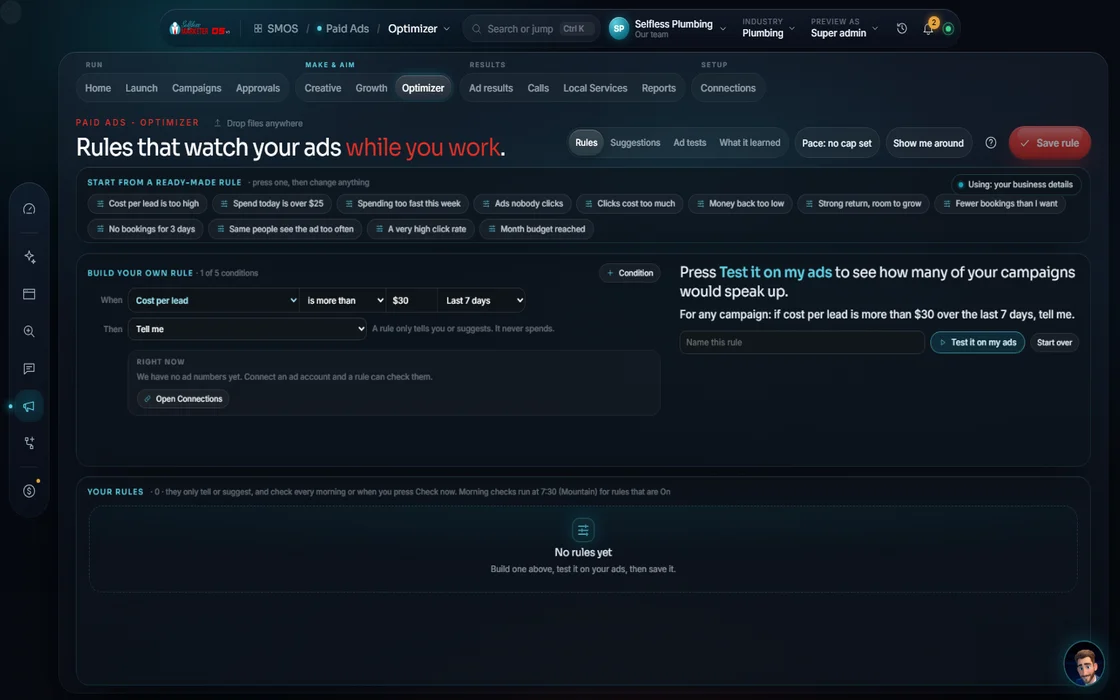
- Notify-only rules
- Pause and scale suggestions; you approve every change
- Dry run on real numbers
- Favored and demoted creative
- Cost per lead, return on spend, spend, click rate, cost per click, frequency, conversions
The rules it follows
- Pace to cap: Compares each active budget to the pro-rated monthly cap; over-pacing glows.
- Compare channels: Puts every channel's measured return side by side; suggests only on a gap over 1.3×.
- Shift budget: Accepting is spend-affecting, so it is cost-gated and approved one shift at a time.
- A/B split test: Variants scored against each other; winners boosted, laggards demoted.
- Learn: Measured results write back to Brand DNA, so your assistant re-ranks what it reaches for next.
Who runs it
YOUR TEAM with the OS, or OUR TEAM for you.
- Accept or reject each shift
- Decide what gets paused
- Watches pacing all day
- Suggests shifts only on real gaps
- Runs rules that notify, never act
- Feeds results back to the creative
- Manages your $500/mo of included ad spend
- Runs the A/B split tests
- Tells you every shift and why in your weekly report
The receipts
What tuning paid ads looked like for real clients
Past client results, documented from each client's analytics and ad accounts. Results vary.
Until a live ad account connects, the Optimizer shows a sample board, marked not real. Live shifts turn on once your account is connected and you approve. With Done-For-You, we tune.
On the way
Coming soon
These are planned and are not in the software yet. We list them so you know what is next.
A daily check tells you when one of your saved rules matches.
Coming soon: V2Test two versions of an ad and see which one does better.
Coming soon: V3Keep going
Related pages
Try the OS
Our free trial is starting soon.
The same tools we use for our done-for-you clients. Our 7-day free trial is starting soon. Until then, book a call and a real person walks you through the OS. $997 a month, first month $497. No contracts.

YOUR TEAM runs it with the OS, or OUR TEAM runs it for you with Done-For-You. Not sure? Which one fits me?