







AI Automation · Automations
Automate what makes sense. Watch every step run.
Some work repeats: a new lead gets a text, a finished job a review ask, an invoice a reminder. Automations draw, run and replay those steps on a canvas.
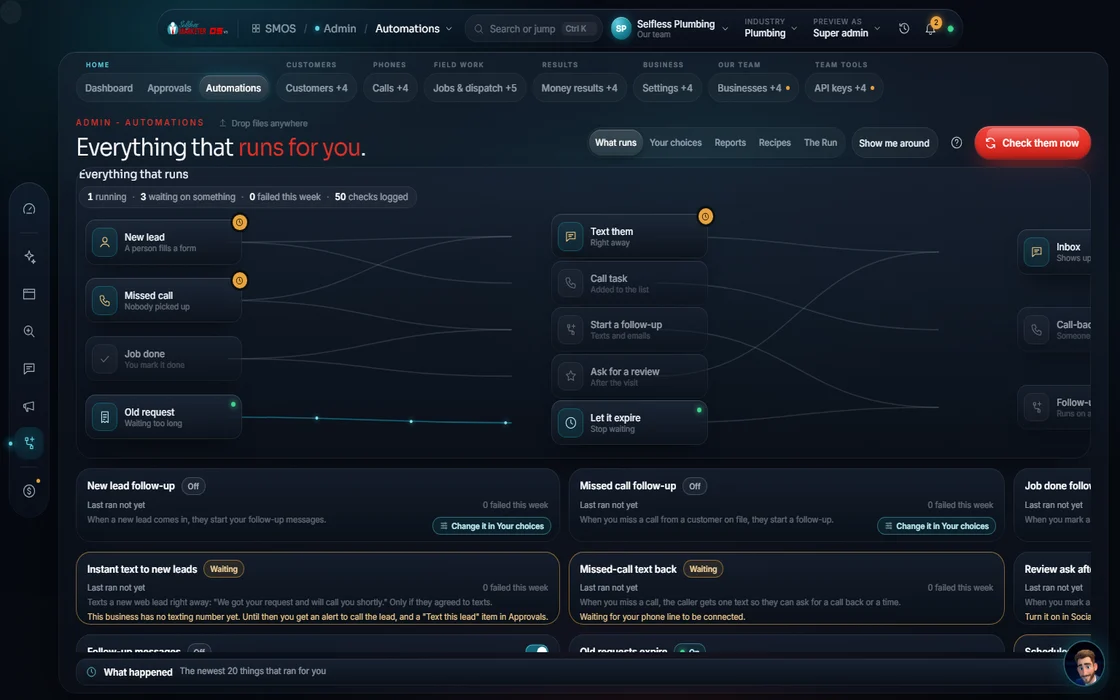 demo business
What it is
We simply analyze your sales process and automate what makes sense
No black box. Each workflow is a drawing of action, wait, text, email and condition nodes. Click a node for label, type, target and payload. Replays light each node with its real status; the inspector shows inputs and outputs.
Every text or email node has a compliance gate. Paid runs say so first: "Approve paid run: this fires." Follow-ups end on STOP. Nothing sends without your approval.
- A connectors list of the tools each workflow can reach
- Import and export any workflow as a file, round-trip exact
Walk the canvas
From a template to a running workflow
- 01
Pick a template You
Lead capture, review request, missed-call rescue, nurture or invoice follow-up.
- 02
Adjust the nodes You
Action, wait, text, email, condition. End states: booked, stop, resolution, approval.
- 03
Check the gates Your assistant
Each texting or email node shows its compliance gate.
- 04
Approve it Approve
Anything paid asks first. Nothing auto-sends.
- 05
Replay a run You
Watch real per-node status and open the in/out inspector.
Everything included
What Automations holds
Canvas
- Action, wait, text, email, condition nodes
- End states: booked, stop, resolution, approval
- Node inspector: label, type, target, payload
- Nodes colored by real run status
Running
- Execution replay
- Per-node in/out inspector
- Compliance gate per sending node
- "Approve paid run" before anything costs money
- Import / export as a file
Building blocks
- Connectors list
- Recipes from any studio
- Snapshots: clone, skip or overwrite
- 5 starter templates
The rules it follows
- New lead: Form or ad lead → CRM contact → route to a CSR → a heads-up to your team.
- Review request: Pick customers → approve the message → review invite.
- Missed call: Missed call → text-back with booking link → STOP if answered.
- Nurture: Email + text cadence with an opt-out STOP branch.
- Invoice follow-up: Invoice sent → reminder cadence → mark paid → thank-you.
- Reuse: Save any studio's work as a recipe; snapshot a site, campaign or workflow and apply it (clone, skip or overwrite).
The engines behind it
- pg-boss: Background jobs that step each contact through (free engine, $0)
- Telnyx: Text messages (metered, asks first)
- See every engine in this group
Who runs it
YOUR TEAM with the OS, or OUR TEAM for you.
- Pick what to automate
- Approve before anything paid runs
- Replay a run when you want to check
- Runs each workflow
- Checks compliance at every sending node
- Stops follow-up the moment someone replies
- Logs every run
- Analyzes your current sales process on the onboarding call
- Builds the workflows that make sense
- Keeps your people on the human, money-making work
The live canvas runs once the workflow engine connects; until then replay says it can't run yet, never faking a result. With Done-For-You, we build your automations.
On the way
Coming soon
These are planned and are not in the software yet. We list them so you know what is next.
See a flow run step by step, with pauses for your approval.
Coming soon: V2Keep going
Related pages
Try the OS
Our free trial is starting soon.
The same tools we use for our done-for-you clients. Our 7-day free trial is starting soon. Until then, book a call and a real person walks you through the OS. $997 a month, first month $497. No contracts.

YOUR TEAM runs it with the OS, or OUR TEAM runs it for you with Done-For-You. Not sure? Which one fits me?