







Website · Publish
One button. Your whole site, live and saved.
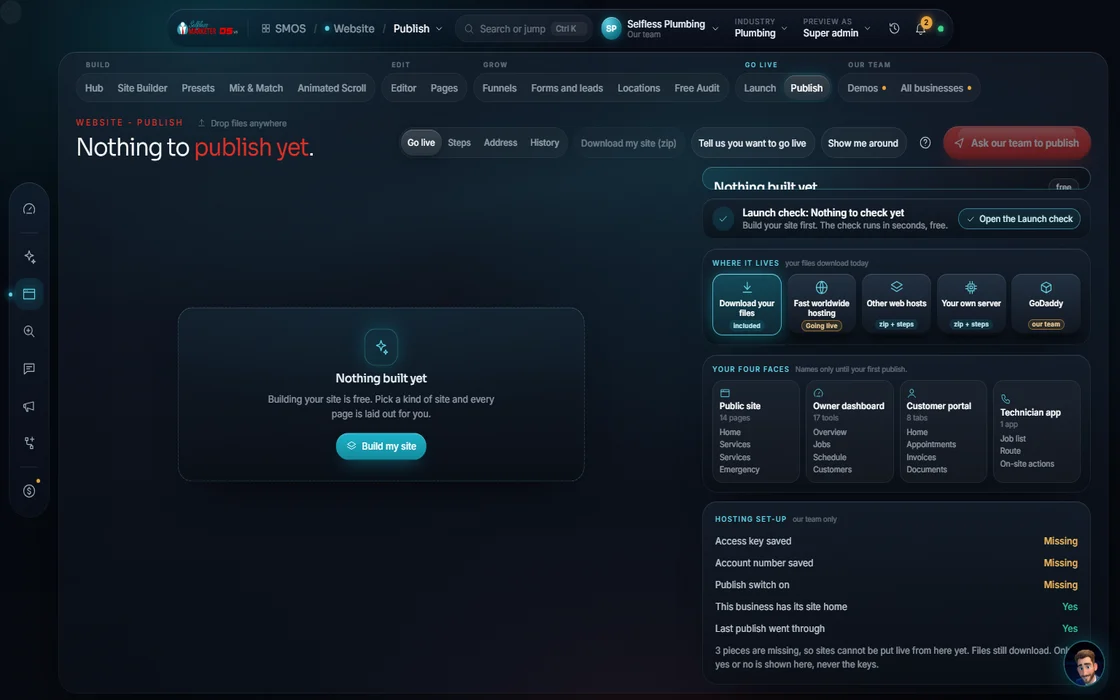
One-button publish to our hosting with SSL. Bringing your own domain? We connect it with you.
 demo business
What it is
Going live without the tech headache
Publish is the Website department's last step. One button runs 8 visible steps: build pages, save them ready-to-serve, add Google business info, create your search-engine map, set up hosting, connect your domain, turn on the security lock (SSL), go live. Tap a step to see what it did.
It replaces a hosting account, domain registrar, SSL certificate, structured-data plugin and backup service, each with its own login and bill, plus the fear of breaking something. Every publish is saved, so you can always go back.
For every owner who's asked “is my site actually live?” It shows what was built: page count, size and location.
Walk it
Publish in 5 steps
- 01
Publish for free Approve
One button builds your whole site. Nothing goes live until you say so.
example data - 02
Pick where it lives You
Fast worldwide hosting with easy rollback, quick setup with preview links, or your own server.
- 03
Pick your address
A private link with no domain, a test address hidden from search, or your real domain open to all.
- 04
Every step, in plain view
Watch each of the 8 steps run. Tap any one to see what it did.
- 05
Every version, saved
Each publish is saved in your history, so you can return to any earlier version.
Everything included
Everything in Publish
The 8 steps
- Build all your pages
- Save fast, ready-to-serve pages
- Add Google business info to each page
- Create your search-engine map
- Set up hosting
- Connect your domain
- Turn on the security lock
- Go live
Choices
- Worldwide CDN with easy rollback
- Quick setup with preview links
- Your own server
- Private link
- Test site hidden from search
- Your real domain
- Cloudflare DNS, at your registrar, or external
What you see
- Build time
- Total files
- Pages with structured data
- DNS records status
- SSL certificate status
- Publish history with rollback
- “You've spent $0 so far”
The rules it follows
- Map the site: A sitemap of every page, so search engines find them all.
- Host it: Easy rollback on every choice.
- Point the domain: Start on a free preview address first if you want.
- Keep every version: Every publish saved for rollback.
- Report: Each publish sends a real receipt to Mission Control.
The engines behind it
- Cloudflare: DNS and a fast worldwide network (metered, asks first)
Who runs it
YOUR TEAM with the OS, or OUR TEAM for you.
- Press Publish
- Connect your domain
- Pick where it's hosted
- Builds and checks every page
- Adds search data and the sitemap
- Saves every version
- Premium hosting
- Website security (SSL) and backup systems
- Domain setup and every update after launch
Publishing is built. Hosting, your domain and the security lock finish at go-live. If the publish service is down, the screen says so and invents nothing; press Publish again.
On the way
Coming soon
These are planned and are not in the software yet. We list them so you know what is next.
Publish to more hosts and use your own domain.
Coming soon: V2See each section get built and checked as it happens.
Coming soon: V2Keep going
Related pages
Try the OS
Our free trial is starting soon.
The same tools we use for our done-for-you clients. Our 7-day free trial is starting soon. Until then, book a call and a real person walks you through the OS. $997 a month, first month $497. No contracts.

YOUR TEAM runs it with the OS, or OUR TEAM runs it for you with Done-For-You. Not sure? Which one fits me?